ToF
- OAK-D ToF - 集成 33D ToF 传感器,搭配立体相机对
- OAK-FFC ToF 33D - 带有 33D ToF 传感器的独立 FFC 模块
depth 输出可以替代 StereoDepth 的输出——因此你可以直接将 ToF.depth 链接到 MobileNetSpatialDetectionNetwork / YoloSpatialDetectionNetwork 或 SpatialLocationCalculator。一般来说,ToF 的深度精度比 Stereo 深度更精确。你可以 在 此处了解 ToF 深度精度。ToF 点云演示视频,展示深度精度:如何放置
Python
Python
1pipeline = dai.Pipeline()
2tof = pipeline.create(dai.node.ToF)输入和输出
ToF 设置
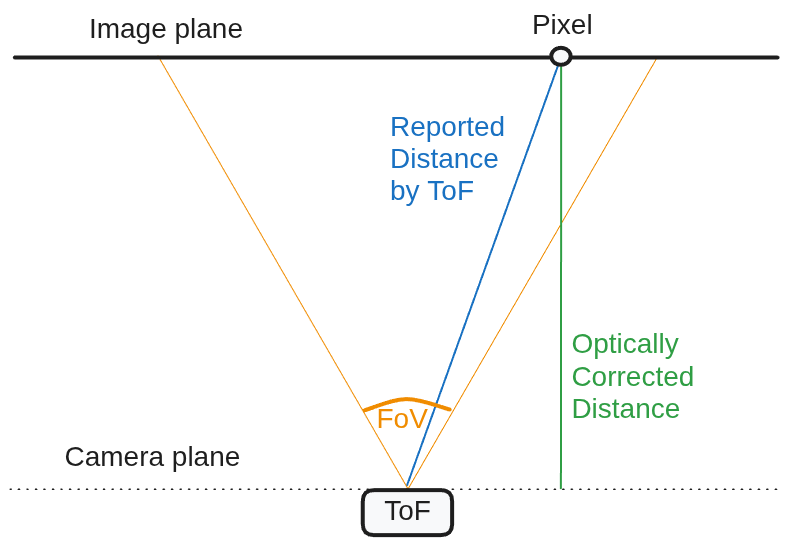
- 光学校正:这是一个校正光学效应的过程。启用后,ToF 返回深度图(如下图的绿线所示)而非距离,从而与 StereoDepth 的深度报告匹配。它执行校正和距离到深度的转换(Z 图)。
- 去畸变:
depth和amplitude帧默认会去畸变。 - 相位解包裹 - 纠正 ToF 传感器相位包裹效应的过程。可设置为 [0..5 为优化值]。数值越大,ToF 量程越长,但也会增加噪声。近似最大距离(精确值见下方 最大距离):
0- 禁用,最远约 1.87 米(使用 80MHz 调制频率)1- 最远约 3 米2- 最远约 4.5 米3- 最远约 6 米4- 最远约 7.5 米
- 突发模式:启用后,ToF 节点不会复用帧,如下图所示。这与 ToF 帧的后处理有关,而非实际传感器/投影仪。默认禁用。
- 相位混洗时间滤波器:平均同一调制频率的混洗和非混洗帧以降低噪声。默认启用。你可以禁用以减少 ToF 运动模糊 和系统负载。
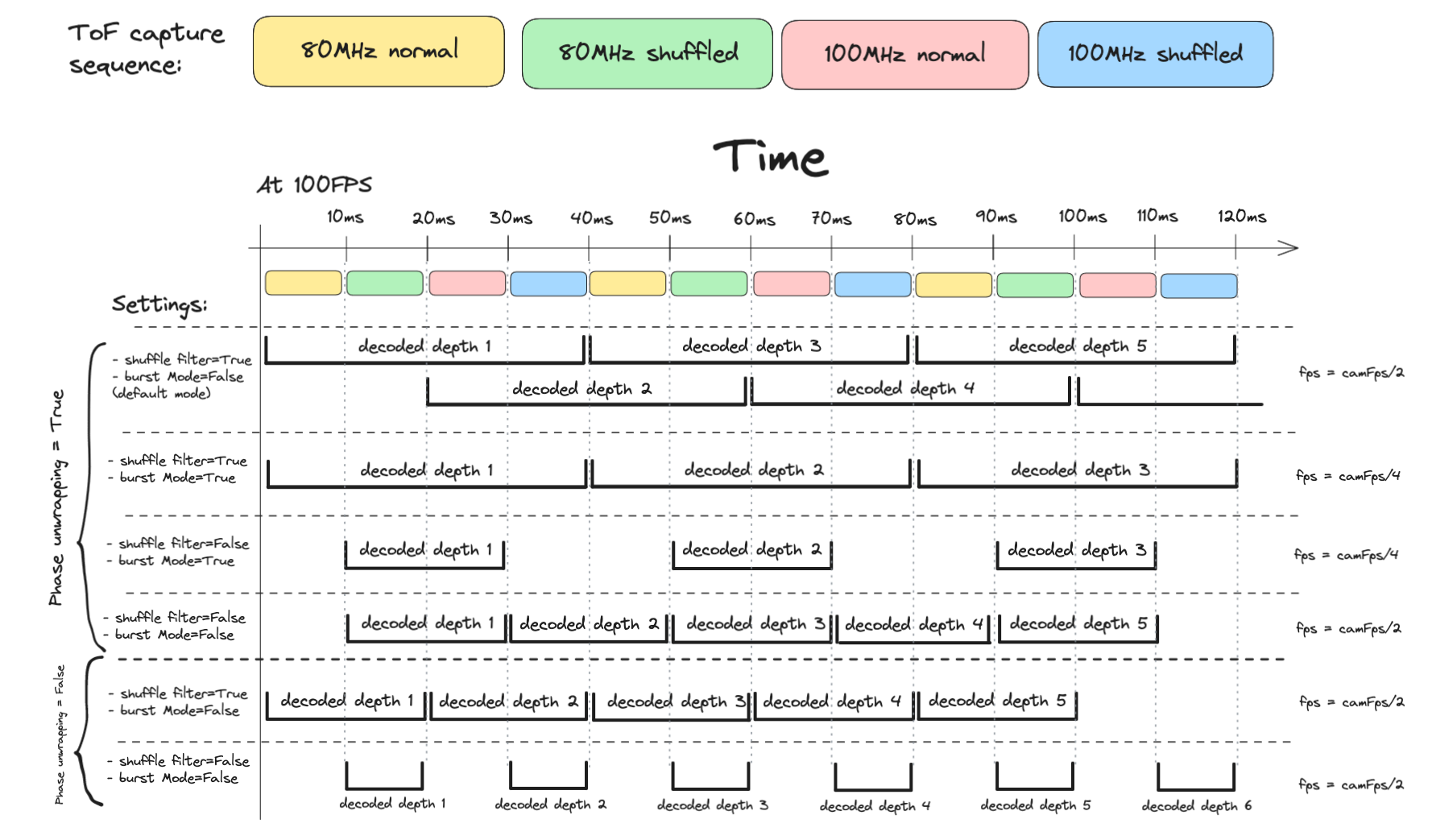
相位解包裹
ToF 运动模糊
- 增加相机帧率。最高可达160FPS,使得帧捕获成为最快(帧间隔6.25ms)。这将减少运动模糊,因为ToF组合多个帧来获得深度。注意:160FPS会显著增加系统负载(参见调试 DepthAI流水线)。另请注意:更高的FPS -> 更短的曝光时间,这可能会增加噪声。
- 禁用相位抖动时域滤波器。这会引入更多噪声。
- 禁用相位解包裹。这将最大距离减少到1.87米(使用80MHz调制频率),因此大约1立方米的空间可见(非常有限的用例)。
- 启用突发模式。如果抖动脉冲滤波器和相位解包裹被禁用,此设置无关紧要(见上图)。启用后,ToF节点不会重用帧(较低的FPS)。
最大距离
Math
1c = 299792458.0 # 光速 m/s
2
3MAX_80MHZ_M = c / (80000000 * 2) = 1.873 m
4MAX_100MHZ_M = c / (100000000 * 2) = 1.498 m
5
6MAX_DIST_80MHZ_M = (phaseUnwrappingLevel + 1) * 1.873 + (phaseUnwrapErrorThreshold / 2)
7MAX_DIST_100MHZ_M = (phaseUnwrappingLevel + 1) * 1.498 + (phaseUnwrapErrorThreshold / 2)
8
9MAX_DIST_PHASE_UNWRAPPING_M = MAX_DIST_100MHZ_M
ToF 帧率
用法
Python
Python
1pipeline = dai.Pipeline()
2
3tof_cam = pipeline.create(dai.node.Camera)
4tof_cam.setFps(30)
5# 假设 ToF 相机传感器位于端口 CAM_A
6tof_cam.setBoardSocket(dai.CameraBoardSocket.CAM_A)
7
8tof = pipeline.create(dai.node.ToF)
9
10# 数字越大 => 处理越快。1 个 shave 核心可以实现 30 FPS。
11tof.setNumShaves(1)
12
13# 中值滤波器,核大小 5x5
14tof.initialConfig.setMedianFilter(dai.MedianFilter.KERNEL_5x5)
15
16tofConfig = tof.initialConfig.get()
17# 时域滤波器平均抖动/非抖动脉冲频率
18tofConfig.enablePhaseShuffleTemporalFilter = True
19# 相位解包裹,用于更远距离。
20tofConfig.phaseUnwrappingLevel = 4 # 最高 7.5 米
21tofConfig.phaseUnwrapErrorThreshold = 300
22tof.initialConfig.set(tofConfig)
23
24# ToF 节点将原始传感器帧转换为深度
25tof_cam.raw.link(tof.input)
26
27# 将 ToF 深度输出发送到主机,或者发送到 SLC / 空间检测网络
28tof.depth.link(xout.input)功能示例
- ToF depth - 获取 ToF 深度的示例
- RGB-ToF Alignment - 将 ToF 深度对齐到彩色流
参考
class
depthai.node.ToF(depthai.Node)
method
setNumFramesPool(self, arg0: typing.SupportsInt) -> ToF: ToFSpecify number of frames in output pool Parameter ``numFramesPool``: Number of frames in output pool
method
setNumShaves(self, arg0: typing.SupportsInt) -> ToF: ToFSpecify number of shaves reserved for ToF decoding.
property
amplitude
Outputs ImgFrame message that carries amplitude image.
property
depth
Outputs ImgFrame message that carries decoded depth image.
property
initialConfig
Initial config to use for depth calculation.
property
input
Input raw ToF data. Default queue is blocking with size 8.
property
inputConfig
Input ToF message with ability to modify parameters in runtime. Default queue is non-blocking with size 4.
property
intensity
Outputs ImgFrame message that carries intensity image.
property
phase
Outputs ImgFrame message that carries phase image, useful for debugging. float32 type.
需要帮助?
请前往 OAKChina 官网 获取技术支持或解答您的任何疑问。