性能优化
理解性能指标
- 延迟:指输入(如图像或视频帧)与神经网络相应输出或响应之间的延迟或滞后。
- 吞吐量:指计算机视觉系统在给定时间内可以处理的数据量或任务数。
- 准确性:衡量系统或模型在正确性方面的表现。
硬件考量
RVC2 NN性能
| 模型名称 | 尺寸 | FPS | 延迟[毫秒] |
|---|---|---|---|
| MobileOne S0 | 224x224 | 165.5 | 11.1 |
| Resnet18 | 224x224 | 94.8 | 19.7 |
| DeepLab V3 | 256x256 | 36.5 | 48.1 |
| DeepLab V3 | 513x513 | 6.3 | 253.1 |
| YoloV6n R2 | 416x416 | 65.5 | 29.3 |
| YoloV6n R2 | 640x640 | 29.3 | 66.4 |
| YoloV6t R2 | 416x416 | 35.8 | 54.1 |
| YoloV6t R2 | 640x640 | 14.2 | 133.6 |
| YoloV6m R2 | 416x416 | 8.6 | 190.2 |
| YoloV7t | 416x416 | 46.7 | 37.6 |
| YoloV7t | 640x640 | 17.8 | 97.0 |
| YoloV8n | 416x416 | 31.3 | 56.9 |
| YoloV8n | 640x640 | 14.3 | 123.6 |
| YoloV8s | 416x416 | 15.2 | 111.9 |
| YoloV8m | 416x416 | 6.0 | 273.8 |
要查看更多RVC2 NN模型的性能,请参考此电子表格。
模型优化技术
Luxonis特定优化
SHAVES数量
降低相机FPS以匹配NN FPS
NN输入队列大小和阻塞行为
setQueueSize()方法设置)时,来自设备的任何额外消息都将被阻塞。库会等待直到能够向队列中添加新消息。 当队列为非阻塞时,在之前的场景中,库会丢弃最旧的消息,将新消息添加到队列,然后继续其处理循环。 如果您的网络具有较高延迟且无法处理那么多帧,将神经网络的输入队列设置为非阻塞可能会提高性能。量化(仅适用于 RVC3 转换)
coco128.zip(从这里下载)。但是,为了获得最佳量化效果和最低的精度损失,建议使用训练集或验证集中的图像。安装 POT,请在 Python 环境中使用以下命令:Command Line
1python -m pip install --upgrade pip
2pip install openvino-dev==2022.1pot-config.json 文件:JSON
1{
2    "model": {
3        "model_name": "yolov6n",
4        "model": "path/to/model.xml",
5        "weights": "path/to/model.bin"
6    },
7    "engine": {
8        "device": "CPU",
9        "type": "simplified",
10        "data_source" : "/path/to/coco128/images/train2017/"
11    },
12    "compression": {
13        "target_device" : "VPU",
14        "algorithms": [
15            {
16                "name": "DefaultQuantization",
17                "params": {
18                    "stat_subset_size": 300
19                 },
20            }
21        ]
22    }
23}Command Line
1pot -c pot-config.json -d性能分析与基准测试
info 日志级别(或更低),depthai 将打印硬件资源的使用情况,特别是 CPU/RAM 消耗、温度、CMX 切片和 SHAVE 核心分配。您可以像这样设置调试级别:Command Line
1DEPTHAI_LEVEL=info python3 script.pyDepthAI 管道图
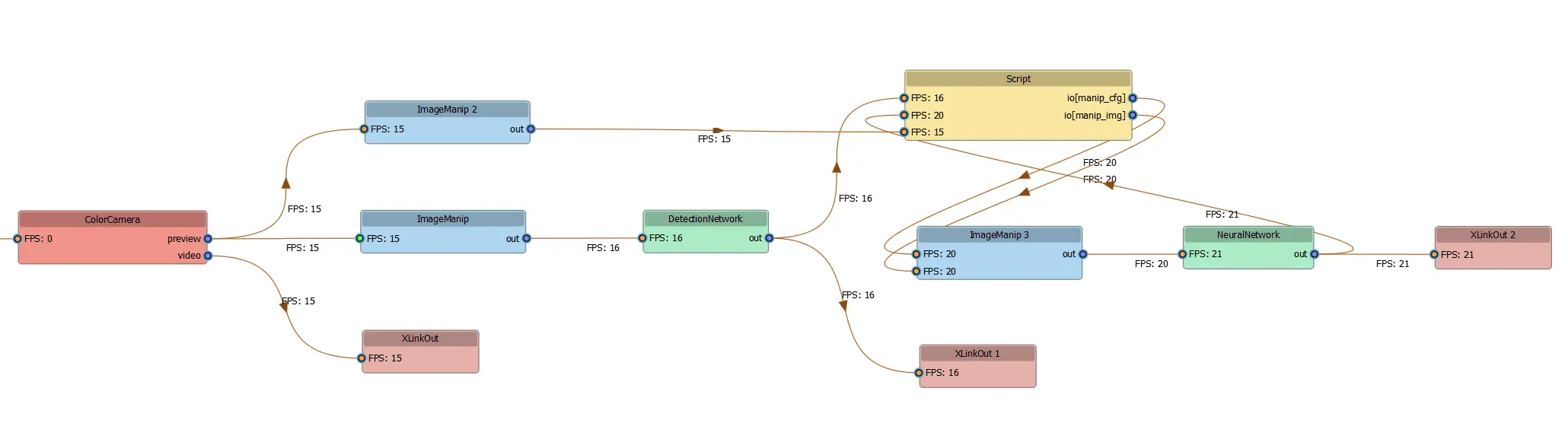
Command Line
1pip install git+https://github.com/luxonis/depthai_pipeline_graph.gitmain.py 脚本中定义的 DepthAI 管道,请使用以下命令:Command Line
1pipeline_graph "python main.py -cam"常见性能问题故障排除
trace,depthai 将记录每个节点/进程的操作时间。要可视化网络,可以使用 netron.app。您可以调查可能导致瓶颈的操作,然后通过在该操作之前剪枝模型来验证假设。要剪枝模型,应将模型优化器 (mo) 的 --output 标志设置为指定节点。要了解更多关于剪枝的信息,请参阅文档。剪枝模型后,编译它,测量其延迟,并与原始(未剪枝)模型的延迟进行比较,以验证您的假设是否正确。