ColorCamera
InputControl 和 InputConfig 对其进行控制。如何放置
Python
Python
1pipeline = dai.Pipeline()
2cam = pipeline.create(dai.node.ColorCamera)输入和输出
inputConfig- ImageManipConfiginputControl- CameraControlraw- ImgFrame - RAW10 Bayer 数据。解包示例代码在此处isp- ImgFrame - YUV420 平面格式(与 YU12/IYUV/I420 相同)still- ImgFrame - NV12,适用于较大尺寸的帧。当发送捕获事件给 ColorCamera 时生成图像,类似于拍照preview- ImgFrame - RGB(或 BGR 平面/交错格式,取决于配置),主要用于小尺寸预览,并将图像输入到 NeuralNetworkvideo- ImgFrame - NV12,适用于较大尺寸的帧
video/preview/still 帧。still(当触发捕获时)和 isp 以最大相机分辨率工作,而 video 和 preview 限制为 最大 4K(3840 x 2160)分辨率,这是从 isp 裁剪得到的。 对于 IMX378(12MP),后处理的工作方式如下: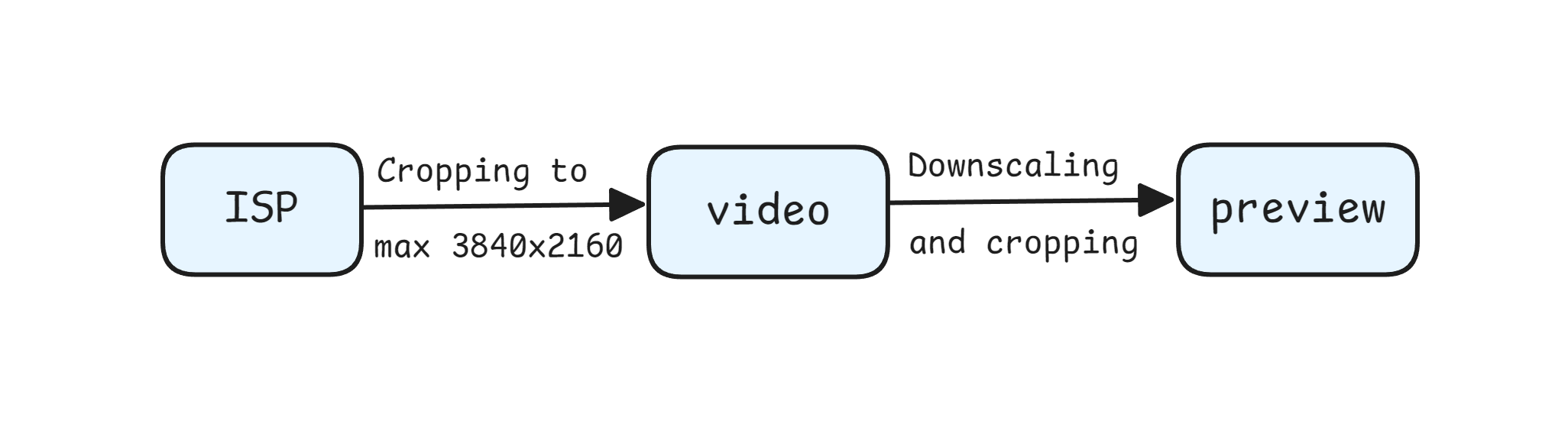
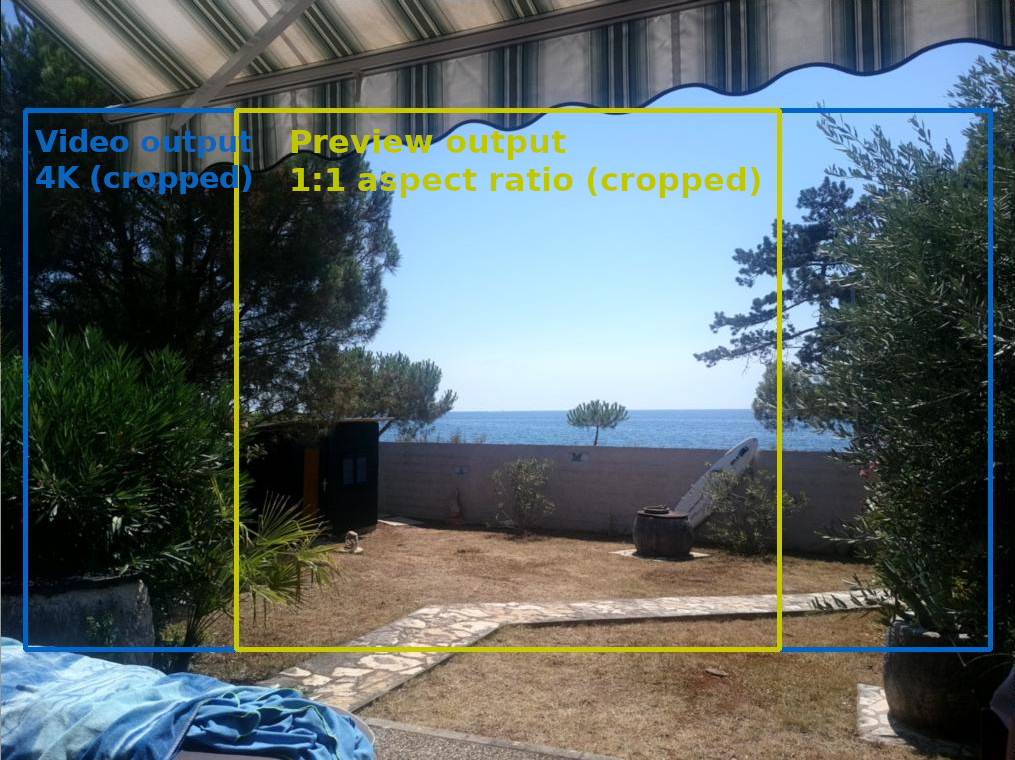
isp 输出(来自 IMX378 的 12MP 分辨率)。如果您不缩小 ISP, 则 video 输出被裁剪为 4K(由于 video 输出的限制,最大 3840x2160),如 蓝色矩形所示。黄色矩形表示当预览大小设置为 1:1 宽高比时裁剪的 preview 输出 (例如,针对 MobileNet-SSD NN 模型使用 300x300 预览大小),因为 preview 输出源自 video 输出。用法
Python
Python
1pipeline = dai.Pipeline()
2cam = pipeline.create(dai.node.ColorCamera)
3cam.setPreviewSize(300, 300)
4cam.setBoardSocket(dai.CameraBoardSocket.CAM_A)
5cam.setResolution(dai.ColorCameraProperties.SensorResolution.THE_1080_P)
6cam.setInterleaved(False)
7cam.setColorOrder(dai.ColorCameraProperties.ColorOrder.RGB)3A 算法
- 立体相机:传感器共享同一条 I2C 总线,可自动同步 3A 设置(AWB、AE)。
- 独立传感器:在 OAK FFC 或 OAK-D-LR 等配置中,每个传感器拥有独立的 I2C,可使用
3a-follow功能将 3A 设置从一个传感器同步到其他传感器。
Python
1cam['cam_b'].initialControl.setMisc("3a-follow", dai.CameraBoardSocket.CAM_A)
2cam['cam_c'].initialControl.setMisc("3a-follow", dai.CameraBoardSocket.CAM_A)
3a-follow 功能将主摄像头(例如 CAM_A)的 3A 设置(曝光、ISO 和白平衡)复制到配置中的其他摄像头(例如 CAM_B 和 CAM_C)。限制
- ISP 大约能处理 600 MP/s,当流水线同时运行神经网络和视频编码器时,大约为 500 MP/s
- 3A 算法总共能处理约 200..250 FPS(针对所有相机流)。这是我们当前实现的限制,我们计划通过变通方法在每第 X 帧上运行 3A 算法,暂无预计时间
- ISP 缩放分子值可为 1..16,分母值可为 1..32(垂直和水平缩放)。因此,您只能将例如 12MP(4056x3040)缩小为此处计算的分辨率
功能示例
参考
class
depthai.node.ColorCamera(depthai.Node)
method
getBoardSocket(self) -> depthai.CameraBoardSocket: depthai.CameraBoardSocketRetrieves which board socket to use Returns: Board socket to use
method
method
getCamera(self) -> str: strRetrieves which camera to use by name Returns: Name of the camera to use
method
getColorOrder(self) -> depthai.ColorCameraProperties.ColorOrder: depthai.ColorCameraProperties.ColorOrderGet color order of preview output frames. RGB or BGR
method
getFp16(self) -> bool: boolGet fp16 (0..255) data of preview output frames
method
getFps(self) -> float: floatGet rate at which camera should produce frames Returns: Rate in frames per second
method
method
getImageOrientation(self) -> depthai.CameraImageOrientation: depthai.CameraImageOrientationGet camera image orientation
method
getInterleaved(self) -> bool: boolGet planar or interleaved data of preview output frames
method
getIspHeight(self) -> int: intGet 'isp' output height
method
getIspNumFramesPool(self) -> int: intGet number of frames in isp pool
method
getIspSize(self) -> tuple[int, int]: tuple[int, int]Get 'isp' output resolution as size, after scaling
method
getIspWidth(self) -> int: intGet 'isp' output width
method
getPreviewHeight(self) -> int: intGet preview height
method
getPreviewKeepAspectRatio(self) -> bool: boolSee also: setPreviewKeepAspectRatio Returns: Preview keep aspect ratio option
method
getPreviewNumFramesPool(self) -> int: intGet number of frames in preview pool
method
getPreviewSize(self) -> tuple[int, int]: tuple[int, int]Get preview size as tuple
method
getPreviewWidth(self) -> int: intGet preview width
method
getRawNumFramesPool(self) -> int: intGet number of frames in raw pool
method
getResolution(self) -> depthai.ColorCameraProperties.SensorResolution: depthai.ColorCameraProperties.SensorResolutionGet sensor resolution
method
getResolutionHeight(self) -> int: intGet sensor resolution height
method
getResolutionSize(self) -> tuple[int, int]: tuple[int, int]Get sensor resolution as size
method
getResolutionWidth(self) -> int: intGet sensor resolution width
method
getSensorCrop(self) -> tuple[float, float]: tuple[float, float]Returns: Sensor top left crop coordinates
method
getSensorCropX(self) -> float: floatGet sensor top left x crop coordinate
method
getSensorCropY(self) -> float: floatGet sensor top left y crop coordinate
method
getStillHeight(self) -> int: intGet still height
method
getStillNumFramesPool(self) -> int: intGet number of frames in still pool
method
getStillSize(self) -> tuple[int, int]: tuple[int, int]Get still size as tuple
method
getStillWidth(self) -> int: intGet still width
method
getVideoHeight(self) -> int: intGet video height
method
getVideoNumFramesPool(self) -> int: intGet number of frames in video pool
method
getVideoSize(self) -> tuple[int, int]: tuple[int, int]Get video size as tuple
method
getVideoWidth(self) -> int: intGet video width
method
getWaitForConfigInput(self) -> bool: boolSee also: setWaitForConfigInput Returns: True if wait for inputConfig message, false otherwise
method
sensorCenterCrop(self)Specify sensor center crop. Resolution size / video size
method
setBoardSocket(self, boardSocket: depthai.CameraBoardSocket)Specify which board socket to use Parameter ``boardSocket``: Board socket to use
method
method
setCamera(self, name: str)Specify which camera to use by name Parameter ``name``: Name of the camera to use
method
setColorOrder(self, colorOrder: depthai.ColorCameraProperties.ColorOrder)Set color order of preview output images. RGB or BGR
method
setFp16(self, fp16: bool)Set fp16 (0..255) data type of preview output frames
method
setFps(self, fps: typing.SupportsFloat)Set rate at which camera should produce frames Parameter ``fps``: Rate in frames per second
method
method
setImageOrientation(self, imageOrientation: depthai.CameraImageOrientation)Set camera image orientation
method
setInterleaved(self, interleaved: bool)Set planar or interleaved data of preview output frames
method
setIsp3aFps(self, isp3aFps: typing.SupportsInt)Isp 3A rate (auto focus, auto exposure, auto white balance, camera controls etc.). Default (0) matches the camera FPS, meaning that 3A is running on each frame. Reducing the rate of 3A reduces the CPU usage on CSS, but also increases the convergence rate of 3A. Note that camera controls will be processed at this rate. E.g. if camera is running at 30 fps, and camera control is sent at every frame, but 3A fps is set to 15, the camera control messages will be processed at 15 fps rate, which will lead to queueing.
method
setIspNumFramesPool(self, arg0: typing.SupportsInt)Set number of frames in isp pool
method
method
setNumFramesPool(self, raw: typing.SupportsInt, isp: typing.SupportsInt, preview: typing.SupportsInt, video: typing.SupportsInt, still: typing.SupportsInt)Set number of frames in all pools
method
setPreviewKeepAspectRatio(self, keep: bool)Specifies whether preview output should preserve aspect ratio, after downscaling from video size or not. Parameter ``keep``: If true, a larger crop region will be considered to still be able to create the final image in the specified aspect ratio. Otherwise video size is resized to fit preview size
method
setPreviewNumFramesPool(self, arg0: typing.SupportsInt)Set number of frames in preview pool
method
method
setRawNumFramesPool(self, arg0: typing.SupportsInt)Set number of frames in raw pool
method
setRawOutputPacked(self, packed: bool)Configures whether the camera `raw` frames are saved as MIPI-packed to memory. The packed format is more efficient, consuming less memory on device, and less data to send to host: RAW10: 4 pixels saved on 5 bytes, RAW12: 2 pixels saved on 3 bytes. When packing is disabled (`false`), data is saved lsb-aligned, e.g. a RAW10 pixel will be stored as uint16, on bits 9..0: 0b0000'00pp'pppp'pppp. Default is auto: enabled for standard color/monochrome cameras where ISP can work with both packed/unpacked, but disabled for other cameras like ToF.
method
setResolution(self, resolution: depthai.ColorCameraProperties.SensorResolution)Set sensor resolution
method
setSensorCrop(self, x: typing.SupportsFloat, y: typing.SupportsFloat)Specifies the cropping that happens when converting ISP to video output. By default, video will be center cropped from the ISP output. Note that this doesn't actually do on-sensor cropping (and MIPI-stream only that region), but it does postprocessing on the ISP (on RVC). Parameter ``x``: Top left X coordinate Parameter ``y``: Top left Y coordinate
method
setStillNumFramesPool(self, arg0: typing.SupportsInt)Set number of frames in preview pool
method
method
setVideoNumFramesPool(self, arg0: typing.SupportsInt)Set number of frames in preview pool
method
method
setWaitForConfigInput(self, wait: bool)Specify to wait until inputConfig receives a configuration message, before sending out a frame. Parameter ``wait``: True to wait for inputConfig message, false otherwise
property
frameEvent
Outputs metadata-only ImgFrame message as an early indicator of an incoming frame. It's sent on the MIPI SoF (start-of-frame) event, just after the exposure of the current frame has finished and before the exposure for next frame starts. Could be used to synchronize various processes with camera capture. Fields populated: camera id, sequence number, timestamp
property
initialControl
Initial control options to apply to sensor
property
inputConfig
Input for ImageManipConfig message, which can modify crop parameters in runtime Default queue is non-blocking with size 8
property
inputControl
Input for CameraControl message, which can modify camera parameters in runtime Default queue is blocking with size 8
property
isp
Outputs ImgFrame message that carries YUV420 planar (I420/IYUV) frame data. Generated by the ISP engine, and the source for the 'video', 'preview' and 'still' outputs
property
preview
Outputs ImgFrame message that carries BGR/RGB planar/interleaved encoded frame data. Suitable for use with NeuralNetwork node
property
raw
Outputs ImgFrame message that carries RAW10-packed (MIPI CSI-2 format) frame data. Captured directly from the camera sensor, and the source for the 'isp' output.
property
still
Outputs ImgFrame message that carries NV12 encoded (YUV420, UV plane interleaved) frame data. The message is sent only when a CameraControl message arrives to inputControl with captureStill command set.
property
video
Outputs ImgFrame message that carries NV12 encoded (YUV420, UV plane interleaved) frame data. Suitable for use with VideoEncoder node
需要帮助?
请前往 OAKChina 官网 获取技术支持或解答您的任何疑问。