Sync
最后更新
How to Place it
Python
Python
1pipeline = dai.Pipeline()
2sync = pipeline.create(dai.node.Sync)Inputs and Outputs
Message Synchronization
depthai.node.Sync.setSyncThreshold and depthai.node.Sync.setSyncAttempts method. More info in the Reference section.Sync Logic
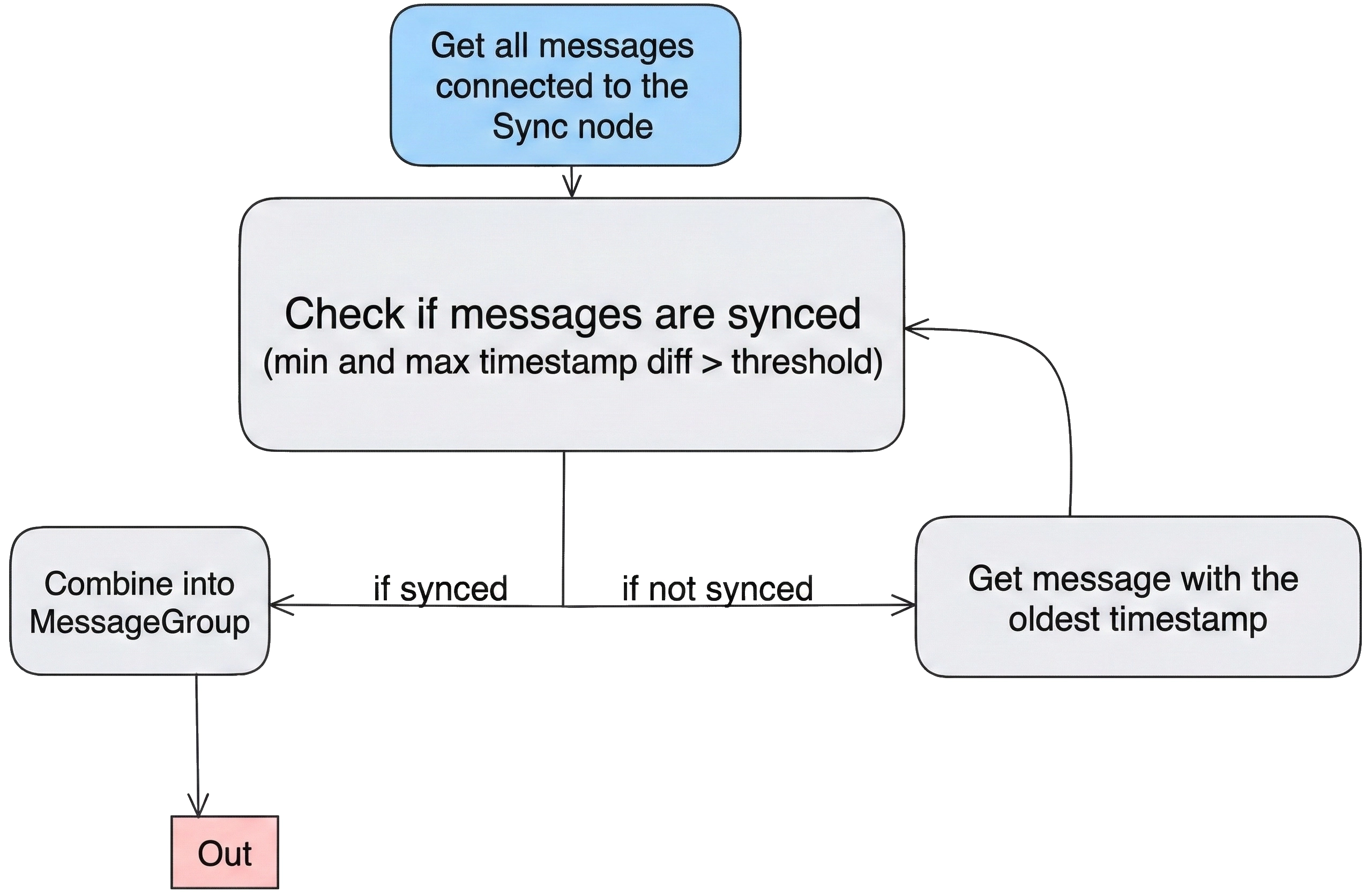
Usage
Python
Python
1pipeline = dai.Pipeline()
2sync = pipeline.create(dai.node.Sync)
3
4# Configure threshold for timestamp alignment
5sync.setSyncThreshold(timedelta(milliseconds=50))
6
7# Configure inputs to be synchronized
8camRgb.video.link(sync.inputs["input1"])
9stereo.depth.link(sync.inputs["input2"])
10
11sync.out.link(xout.input)
12# ...Examples of Functionality
Reference
class
depthai.node.Sync(depthai.Node)
method
getProcessor(self) -> depthai.ProcessorType: depthai.ProcessorTypeGet on which processor the node should run Returns: Processor type - Leon CSS or Leon MSS
method
getSyncAttempts(self) -> int: intGets the number of sync attempts
method
getSyncThreshold(self) -> datetime.timedelta: datetime.timedeltaGets the maximal interval between messages in the group in milliseconds
method
setProcessor(self, arg0: depthai.ProcessorType)Set on which processor the node should run Parameter ``type``: Processor type - Leon CSS or Leon MSS
method
setSyncAttempts(self, maxDataSize: typing.SupportsInt)Set the number of attempts to get the specified max interval between messages in the group Parameter ``syncAttempts``: Number of attempts to get the specified max interval between messages in the group: - if syncAttempts = 0 then the node sends a message as soon at the group is filled - if syncAttempts > 0 then the node will make syncAttemts attempts to synchronize before sending out a message - if syncAttempts = -1 (default) then the node will only send a message if successfully synchronized
method
setSyncThreshold(self, syncThreshold: datetime.timedelta)Set the maximal interval between messages in the group Parameter ``syncThreshold``: Maximal interval between messages in the group
property
inputs
A map of inputs
property
out
Output message of type MessageGroup
需要帮助?
请访问讨论论坛以获取技术支持或您可能有的任何其他问题。