要查看精度测量,请参见 深度精度。
如何放置
Python
Python
1pipeline = dai.Pipeline()
2stereo = pipeline.create(dai.node.StereoDepth)输入和输出
调试输出:
用法
Python
Python
1pipeline = dai.Pipeline()
2stereo = pipeline.create(dai.node.StereoDepth)
3
4# 设置配置文件预设为 ROBOTICS
5stereo.setDefaultProfilePreset(dai.node.StereoDepth.PresetMode.ROBOTICS)
6# 更好处理遮挡:
7stereo.setLeftRightCheck(True)
8# 更近的最小深度,视差范围加倍:
9stereo.setExtendedDisparity(True)
10# 更远距离的更好精度,分数视差32级:
11stereo.setSubpixel(True)
12
13# 事先定义和配置 MonoCamera 节点
14left.out.link(stereo.left)
15right.out.link(stereo.right)功能示例
- 立体深度 - 可视化来自立体相机的视差深度。
- 立体深度重映射 - 将视差深度 <frame> 的几何形状重映射到彩色帧。
- 来自主机的立体深度 - 使用来自主机的预校正立体图像在设备上运行立体视差。
- 立体深度滤波器 - 对立体深度输出应用多种滤波器。
- 立体深度标定更新 - 动态更新立体标定参数。
深度对齐
Python
1pipeline = dai.Pipeline()
2stereo = pipeline.create(dai.node.StereoDepth)
3 # alignment to RECTIFIED_LEFT or RECTIFIED_RIGHT
4stereo.setDepthAlign(dai.StereoDepthConfig.AlgorithmControl.DepthAlign.RECTIFIED_LEFT)Python
1align = pipeline.create(dai.node.ImageAlign)
2stereo.depth.link(align.input)
3rgbOut.link(align.inputAlignTo)  # Align depth to RGB
4align.outputAligned.link(sync.inputs["depth_aligned"])
为高帧率配置相机
Python
1with dai.Pipeline(device) as pipeline:
2  stereo = pipeline.create(dai.node.StereoDepth)
3  mono_left = pipeline.create(dai.node.Camera).build(dai.CameraBoardSocket.CAM_B)
4  mono_right = pipeline.create(dai.node.Camera).build(dai.CameraBoardSocket.CAM_C)
5
6  def configure_cam(cam, size_x: int, size_y: int, fps: float):
7    cap = dai.ImgFrameCapability()
8    cap.size.fixed((size_x, size_y))
9    cap.fps.fixed(fps)
10  return cam.requestOutput(cap, True)
11
12  # Configure MonoCameras for 60 FPS at 640x400
13  mono_left_out = configure_cam(mono_left, 640, 400, 60)
14 mono_right_out = configure_cam(mono_right, 640, 400, 60)在运行时更改相机标定
device.setCalibration() 方法更改标定,并且可以与 动态标定 结合使用,如果设备立体质量因环境因素随时间下降。可以使用 device.getCalibration() 获取相同的数据。平台特定配置
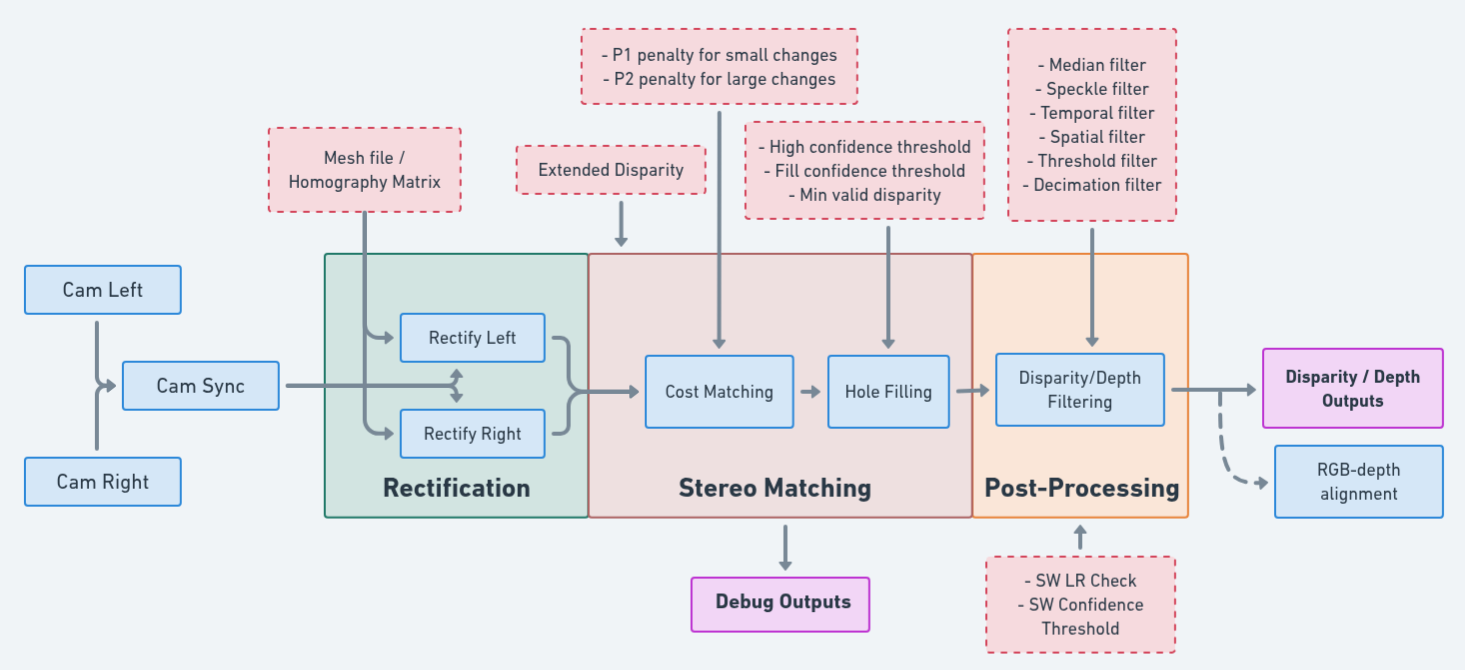
RVC4
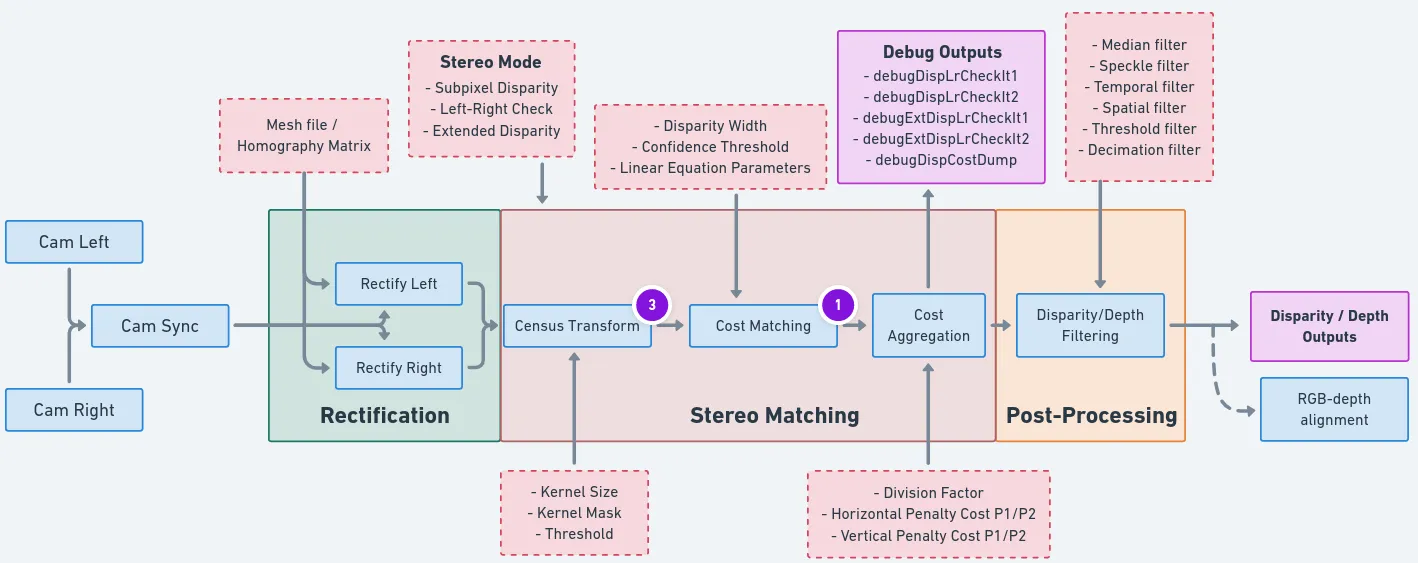
StereoDepth 节点内部框图
深度预设
| 立体深度预设 | 使用场景 | FPS @800P | FPS @400P | 输出分辨率 | 运动模糊 | 范围(米) |
|---|---|---|---|---|---|---|
| 快速精度 | 通用 | 60 | 60 | 输入分辨率 | False | 0–65 |
| 快速密集 | 通用 | 36 | 60 | 输入分辨率 | False | 0–65 |
这些速度将在 DepthAI 未来版本中提升——快速密集可达 72 FPS,快速精度可达 120 FPS。
深度配置
扩展视差
- 在原始尺寸图像(例如 1280×800)上计算视差。
- 在 2 倍缩小图像(例如 640×400)上计算视差。
- 合并两个层级的视差。
用法:
Python
1stereo.setExtendedDisparity(True)亚像素视差
左右校验
用法:
Python
1stereo.initialConfig.algorithmControl.enableSwLeftRightCheck = True
2stereo.initialConfig.algorithmControl.leftRightCheckThreshold = 10 # 设置阈值软件置信度
- 轻度过滤:50–100
- 中等过滤:200
- 重度过滤:>200(非常依赖场景)
用法:
Python
1stereo.initialConfig.costMatching.enableSwConfidenceThresholding = True
2stereo.initialConfig.costMatching.confidenceThreshold = 200 # 根据所需过滤级别调整置信度指标(遮挡、运动向量、平坦度)
- 遮挡置信度权重
- 基本上执行左右校验。比较从左到右和从右到左搜索(前向/后向运动向量一致性)得到的视差差异。
- 运动向量(MV)置信度权重
- MV 方差计算每个像素局部边缘感知窗口内的方差;给定约束条件,确保同一物体内深度平滑且一致。
- MV 置信度阈值:MV 方差的阈值偏移。有效范围为 [0,3]。值为 0 允许最大方差。
- 平坦度置信度权重
- 平坦度考虑输入图像纹理,并屏蔽掉相邻特征过于相似的低纹理区域。可通过平坦度阈值调整所需的最小纹理量。
- 平坦度阈值:平坦区域检查的阈值。该值越高,基于 Census 特征比较,像素越容易被检测为平坦区域。用于没有足够匹配特征的低纹理区域。
- 平坦度覆盖:如果像素被检测为平坦区域,则将置信度设为零。
使用方法:
Python
1# 置信度度量权重(RVC4 必须总和为 32)
2stereo.initialConfig.confidenceMetrics.occlusionConfidenceWeight = 12
3stereo.initialConfig.confidenceMetrics.motionVectorConfidenceWeight = 10
4stereo.initialConfig.confidenceMetrics.flatnessConfidenceWeight = 10
5
6# 阈值
7stereo.initialConfig.confidenceMetrics.motionVectorConfidenceThreshold = 1 # 有效范围 [0,3]
8stereo.initialConfig.confidenceMetrics.flatnessConfidenceThreshold = 5
9stereo.initialConfig.confidenceMetrics.flatnessOverride = True # 若为平坦区域,则将置信度设为 0自适应中值滤波
使用方法:
Python
1stereo.initialConfig.postProcessing.adaptiveMedianFilter.enable = True
2stereo.initialConfig.postProcessing.adaptiveMedianFilter.confidenceThreshold = 200 # 应小于空洞填充的 fillConfidenceThreshold空洞填充
- 将像素分组为超像素(六边形区域)
- 使用置信度高于高置信度阈值的像素计算每个超像素的视差值
- 根据填充置信度阈值和最小有效视差要求填补空洞
- 高置信度阈值 — 置信度高于此阈值的像素用于计算每个超像素的视差值。若设为最大值(255),则不应形成任何超像素。
- 填充置信度阈值 — 置信度低于此值的像素将被滤除(如果
invalidateDisparities设为True)或参与超像素计算。 - 最小有效视差 — 决定一个区域内需要有多少比例的像素置信度高于高置信度阈值,才能被纳入超像素的视差计算。取值:1(50%)、2(25%)或 3(12.5%)。最小有效视差越大,超像素越大(六边形越多)。
- 使视差无效 — 若设为
True,则最终视差图中低于填充置信度阈值的像素将被滤除。
使用方法:
Python
1stereo.initialConfig.postProcessing.holeFilling.enable = True
2stereo.initialConfig.postProcessing.holeFilling.highConfidenceThreshold = 200
3stereo.initialConfig.postProcessing.holeFilling.fillConfidenceThreshold = 210
4stereo.initialConfig.postProcessing.holeFilling.minValidDisparity = 1 # 1、2 或 3
5stereo.initialConfig.postProcessing.holeFilling.invalidateDisparities = True中值滤波
使用方法:
Python
1stereo.initialConfig.setMedianFilter(dai.MedianFilter.KERNEL_3x3) # 选项:MEDIAN_OFF、KERNEL_3x3、KERNEL_5x5斑点滤波
使用方法:
Python
1stereo.initialConfig.postProcessing.speckleFilter.enable = True
2stereo.initialConfig.postProcessing.speckleFilter.speckleRange = 48时域滤波
使用方法:
Python
1stereo.initialConfig.postProcessing.temporalFilter.enable = True
2stereo.initialConfig.postProcessing.temporalFilter.alpha = 0.4 # 当前帧的权重(0-1)
3stereo.initialConfig.postProcessing.temporalFilter.delta = 3 # 有效深度变化的阈值空间滤波
用法:
Python
1stereo.initialConfig.postProcessing.spatialFilter.enable = True
2stereo.initialConfig.postProcessing.spatialFilter.alpha = 0.5 # 边缘保持强度
3stereo.initialConfig.postProcessing.spatialFilter.delta = 8 # 有效深度变化阈值
4stereo.initialConfig.postProcessing.spatialFilter.holeFillingRadius = 2 # 空洞填充半径
5stereo.initialConfig.postProcessing.spatialFilter.numIterations = 1 # 迭代次数亮度滤波器
用法:
Python
1stereo.initialConfig.postProcessing.brightnessFilter.enable = True
2stereo.initialConfig.postProcessing.brightnessFilter.minBrightness = 0 # 最小亮度阈值
3stereo.initialConfig.postProcessing.brightnessFilter.maxBrightness = 255 # 最大亮度阈值阈值滤波器
用法:
Python
1stereo.initialConfig.postProcessing.thresholdFilter.minRange = 0 # 最小深度(厘米)
2stereo.initialConfig.postProcessing.thresholdFilter.maxRange = 200 # 最大深度(厘米)降采样滤波器
用法:
Python
1stereo.initialConfig.postProcessing.decimationFilter.decimationFactor = 2 # 1 = 禁用,2 = 2 倍降采样,以此类推滤波顺序
用法:
Python
1config.postProcessing.filteringOrder = [
2    dai.RawStereoDepthConfig.PostProcessing.Filter.TEMPORAL,
3    dai.RawStereoDepthConfig.PostProcessing.Filter.SPECKLE,
4    dai.RawStereoDepthConfig.PostProcessing.Filter.SPATIAL,
5    dai.RawStereoDepthConfig.PostProcessing.Filter.MEDIAN,
6    dai.RawStereoDepthConfig.PostProcessing.Filter.DECIMATION
7]
8stereo.initialConfig.set(config)限制
- 中值滤波器:在 RVC4 上,中值滤波器由软件(CPU)实现,仅支持 3x3 或 5x5 内核尺寸。如果请求 7x7,会自动降级为 5x5。
- 亚像素:在 RVC4 上固定为 4 位(无法更改为 3 或 5 位)。
- LR 检查:完全由 CPU 上的软件运行(不像 RVC2 那样由硬件加速)。
参考
class
dai::node::StereoDepth
variable
std::shared_ptr< StereoDepthConfig > initialConfig
variable
Input inputConfig
variable
Input inputAlignTo
Input align to message. Default queue is non-blocking with size 1.
variable
variable
variable
Output depth
Outputs ImgFrame message that carries RAW16 encoded (0..65535) depth data in depth units (millimeter by default).Non-determined / invalid depth values are set to 0
variable
Output disparity
Outputs ImgFrame message that carries RAW8 / RAW16 encoded disparity data: RAW8 encoded (0..95) for standard mode; RAW8 encoded (0..190) for extended disparity mode; RAW16 encoded for subpixel disparity mode:
- 0..760 for 3 fractional bits (by default)
- 0..1520 for 4 fractional bits
- 0..3040 for 5 fractional bits
variable
variable
variable
Output rectifiedLeft
variable
Output rectifiedRight
variable
Output outConfig
variable
Output debugDispLrCheckIt1
Outputs ImgFrame message that carries left-right check first iteration (before combining with second iteration) disparity map. Useful for debugging/fine tuning.
variable
Output debugDispLrCheckIt2
Outputs ImgFrame message that carries left-right check second iteration (before combining with first iteration) disparity map. Useful for debugging/fine tuning.
variable
Output debugExtDispLrCheckIt1
Outputs ImgFrame message that carries extended left-right check first iteration (downscaled frame, before combining with second iteration) disparity map. Useful for debugging/fine tuning.
variable
Output debugExtDispLrCheckIt2
Outputs ImgFrame message that carries extended left-right check second iteration (downscaled frame, before combining with first iteration) disparity map. Useful for debugging/fine tuning.
variable
Output debugDispCostDump
variable
Output confidenceMap
Outputs ImgFrame message that carries RAW8 confidence map. Lower values mean lower confidence of the calculated disparity value. RGB alignment, left-right check or any postprocessing (e.g., median filter) is not performed on confidence map.
function
StereoDepth()inline function
std::shared_ptr< StereoDepth > build(Node::Output & left, Node::Output & right, PresetMode presetMode)function
std::shared_ptr< StereoDepth > build(bool autoCreateCameras, PresetMode presetMode, const std::pair< int, int > & size, std::optional< float > fps)Create StereoDepth node. Note that this API is global and if used autocreated cameras can't be reused.
Parameters
- autoCreateCameras: If true, will create left and right nodes if they don't exist
- presetMode: Preset mode for stereo depth
function
void loadMeshFiles(const std::filesystem::path & pathLeft, const std::filesystem::path & pathRight)Specify local filesystem paths to the mesh calibration files for 'left' and 'right' inputs.When a mesh calibration is set, it overrides the camera intrinsics/extrinsics matrices. Overrides useHomographyRectification behavior. Mesh format: a sequence of (y,x) points as 'float' with coordinates from the input image to be mapped in the output. The mesh can be subsampled, configured by With a 1280x800 resolution and the default (16,16) step, the required mesh size is:width: 1280 / 16 + 1 = 81height: 800 / 16 + 1 = 51
function
void loadMeshData(const std::vector< std::uint8_t > & dataLeft, const std::vector< std::uint8_t > & dataRight)Specify mesh calibration data for 'left' and 'right' inputs, as vectors of bytes. Overrides useHomographyRectification behavior. See
function
void setMeshStep(int width, int height)Set the distance between mesh points. Default: (16, 16)
function
void setInputResolution(int width, int height)function
void setInputResolution(const std::tuple< int, int > & resolution)function
void setOutputSize(int width, int height)Specify disparity/depth output resolution size, implemented by scaling.Currently only applicable when aligning to RGB camera
function
void setOutputKeepAspectRatio(bool keep)Specifies whether the frames resized by
function
void setDepthAlign(Properties::DepthAlign align)Parameters
- align: Set the disparity/depth alignment: centered (between the 'left' and 'right' inputs), or from the perspective of a rectified output stream
function
void setDepthAlign(CameraBoardSocket camera)Parameters
- camera: Set the camera from whose perspective the disparity/depth will be aligned
function
void setRectification(bool enable)Rectify input images or not.
function
void setLeftRightCheck(bool enable)Computes and combines disparities in both L-R and R-L directions, and combine them.For better occlusion handling, discarding invalid disparity values
function
void setSubpixel(bool enable)Computes disparity with sub-pixel interpolation (3 fractional bits by default).Suitable for long range. Currently incompatible with extended disparity
function
void setSubpixelFractionalBits(int subpixelFractionalBits)Number of fractional bits for subpixel mode. Default value: 3. Valid values: 3,4,5. Defines the number of fractional disparities: 2^x. Median filter postprocessing is supported only for 3 fractional bits.
function
void setExtendedDisparity(bool enable)Disparity range increased from 0-95 to 0-190, combined from full resolution and downscaled images.Suitable for short range objects. Currently incompatible with sub-pixel disparity
function
void setRectifyEdgeFillColor(int color)Fill color for missing data at frame edges
Parameters
- color: Grayscale 0..255, or -1 to replicate pixels
function
void setRuntimeModeSwitch(bool enable)Enable runtime stereo mode switch, e.g. from standard to LR-check. Note: when enabled resources allocated for worst case to enable switching to any mode.
function
void setNumFramesPool(int numFramesPool)Specify number of frames in pool.
Parameters
- numFramesPool: How many frames should the pool have
function
void setPostProcessingHardwareResources(int numShaves, int numMemorySlices)Specify allocated hardware resources for stereo depth. Suitable only to increase post processing runtime.
Parameters
- numShaves: Number of shaves.
- numMemorySlices: Number of memory slices.
function
void setDefaultProfilePreset(PresetMode mode)Sets a default preset based on specified option.
Parameters
- mode: Stereo depth preset mode
Parameters
If using alpha scaling on RVC4 the DEFAULT, DENSITY, and FAST_DENSITY presets can produce inaccurate depth in black padded regions, as they prioritize coverage.
function
void useHomographyRectification(bool useHomographyRectification)Use 3x3 homography matrix for stereo rectification instead of sparse mesh generated on device. Default behaviour is AUTO, for lenses with FOV over 85 degrees sparse mesh is used, otherwise 3x3 homography. If custom mesh data is provided through loadMeshData or loadMeshFiles this option is ignored.
Parameters
- useHomographyRectification: true: 3x3 homography matrix generated from calibration data is used for stereo rectification, can't correct lens distortion. false: sparse mesh is generated on-device from calibration data with mesh step specified with setMeshStep (Default: (16, 16)), can correct lens distortion. Implementation for generating the mesh is same as opencv's initUndistortRectifyMap function. Only the first 8 distortion coefficients are used from calibration data.
function
void enableDistortionCorrection(bool enableDistortionCorrection)Equivalent to useHomographyRectification(!enableDistortionCorrection)
function
void setFrameSync(bool enableFrameSync)Whether to enable frame syncing inside stereo node or not. Suitable if inputs are known to be synced.
function
void setBaseline(float baseline)Override baseline from calibration. Used only in disparity to depth conversion. Units are centimeters.
function
void setFocalLength(float focalLength)Override focal length from calibration. Used only in disparity to depth conversion. Units are pixels.
function
void setDisparityToDepthUseSpecTranslation(bool specTranslation)Use baseline information for disparity to depth conversion from specs (design data) or from calibration. Default: true
function
void setRectificationUseSpecTranslation(bool specTranslation)Obtain rectification matrices using spec translation (design data) or from calibration in calculations. Should be used only for debugging. Default: false
function
void setDepthAlignmentUseSpecTranslation(bool specTranslation)Use baseline information for depth alignment from specs (design data) or from calibration. Default: true
function
void setAlphaScaling(float alpha)Free scaling parameter between 0 (when all the pixels in the undistorted image are valid) and 1 (when all the source image pixels are retained in the undistorted image). On some high distortion lenses, and/or due to rectification (image rotated) invalid areas may appear even with alpha=0, in these cases alpha < 0.0 helps removing invalid areas. See getOptimalNewCameraMatrix from opencv for more details.
enum
std::uint32_t PresetMode
Preset modes for stereo depth.
enumerator
FAST_ACCURACY
enumerator
FAST_DENSITY
enumerator
DEFAULT
enumerator
FACE
enumerator
HIGH_DETAIL
enumerator
ROBOTICS
enumerator
DENSITY
enumerator
ACCURACY
enum
dai::StereoDepthConfig::MedianFilter MedianFilter
class
dai::StereoDepthConfig
variable
AlgorithmControl algorithmControl
Controls the flow of stereo algorithm - left-right check, subpixel etc.
variable
PostProcessing postProcessing
Controls the postprocessing of disparity and/or depth map.
variable
CensusTransform censusTransform
Census transform settings.
variable
CostMatching costMatching
Cost matching settings.
variable
CostAggregation costAggregation
Cost aggregation settings.
variable
ConfidenceMetrics confidenceMetrics
Confidence metrics settings. RVC4 only.
variable
dai::ProcessorType filtersBackend
Compute backend for post-processing filters. RVC4 only.
function
StereoDepthConfig()function
~StereoDepthConfig()function
StereoDepthConfig & setDepthAlign(AlgorithmControl::DepthAlign align)Parameters
- align: Set the disparity/depth alignment: centered (between the 'left' and 'right' inputs), or from the perspective of a rectified output stream
function
StereoDepthConfig & setConfidenceThreshold(int confThr)Confidence threshold for disparity calculation
Parameters
- confThr: Confidence threshold value 0..255
function
int getConfidenceThreshold()Get confidence threshold for disparity calculation
function
StereoDepthConfig & setMedianFilter(MedianFilter median)Parameters
- median: Set kernel size for disparity/depth median filtering, or disable
function
MedianFilter getMedianFilter()Get median filter setting
function
StereoDepthConfig & setBilateralFilterSigma(uint16_t sigma)A larger value of the parameter means that farther colors within the pixel neighborhood will be mixed together, resulting in larger areas of semi-equal color.
Parameters
- sigma: Set sigma value for 5x5 bilateral filter. 0..65535
function
uint16_t getBilateralFilterSigma()Get sigma value for 5x5 bilateral filter
function
StereoDepthConfig & setLeftRightCheckThreshold(int threshold)Parameters
- threshold: Set threshold for left-right, right-left disparity map combine, 0..255
function
int getLeftRightCheckThreshold()Get threshold for left-right check combine
function
StereoDepthConfig & setLeftRightCheck(bool enable)Computes and combines disparities in both L-R and R-L directions, and combine them.For better occlusion handling, discarding invalid disparity values
function
bool getLeftRightCheck()Get left-right check setting
function
StereoDepthConfig & setExtendedDisparity(bool enable)Disparity range increased from 95 to 190, combined from full resolution and downscaled images. Suitable for short range objects
function
bool getExtendedDisparity()Get extended disparity setting
function
StereoDepthConfig & setSubpixel(bool enable)Computes disparity with sub-pixel interpolation (3 fractional bits by default).Suitable for long range. Currently incompatible with extended disparity
function
bool getSubpixel()Get subpixel setting
function
StereoDepthConfig & setSubpixelFractionalBits(int subpixelFractionalBits)Number of fractional bits for subpixel mode. Default value: 3. Valid values: 3,4,5. Defines the number of fractional disparities: 2^x. Median filter postprocessing is supported only for 3 fractional bits.
function
int getSubpixelFractionalBits()Get number of fractional bits for subpixel mode
function
StereoDepthConfig & setDepthUnit(AlgorithmControl::DepthUnit depthUnit)Set depth unit of depth map.Meter, centimeter, millimeter, inch, foot or custom unit is available.
function
AlgorithmControl::DepthUnit getDepthUnit()Get depth unit of depth map.
function
StereoDepthConfig & setCustomDepthUnitMultiplier(float multiplier)Set custom depth unit multiplier relative to 1 meter.
function
float getCustomDepthUnitMultiplier()Get custom depth unit multiplier relative to 1 meter.
function
StereoDepthConfig & setDisparityShift(int disparityShift)Shift input frame by a number of pixels to increase minimum depth. For example shifting by 48 will change effective disparity search range from (0,95] to [48,143]. An alternative approach to reducing the minZ. We normally only recommend doing this when it is known that there will be no objects farther away than MaxZ, such as having a depth camera mounted above a table pointing down at the table surface.
function
StereoDepthConfig & setNumInvalidateEdgePixels(int32_t numInvalidateEdgePixels)Invalidate X amount of pixels at the edge of disparity frame. For right and center alignment X pixels will be invalidated from the right edge, for left alignment from the left edge.
function
StereoDepthConfig & setFiltersComputeBackend(dai::ProcessorType filtersBackend)Set filters compute backend RVC4 only.
function
dai::ProcessorType getFiltersComputeBackend()Get filters compute backend RVC4 only.
function
float getMaxDisparity()Useful for normalization of the disparity map.
Returns
Maximum disparity value that the node can return
function
void serialize(std::vector< std::uint8_t > & metadata, DatatypeEnum & datatype)inline function
DatatypeEnum getDatatype()function
DEPTHAI_SERIALIZE(StereoDepthConfig, algorithmControl, postProcessing, censusTransform, costMatching, costAggregation, confidenceMetrics, filtersBackend)struct
dai::StereoDepthConfig::AlgorithmControl
variable
DepthAlign depthAlign
Set the disparity/depth alignment to the perspective of a rectified output, or center it
variable
DepthUnit depthUnit
Measurement unit for depth data. Depth data is integer value, multiple of depth unit.
variable
float customDepthUnitMultiplier
Custom depth unit multiplier, if custom depth unit is enabled, relative to 1 meter. A multiplier of 1000 effectively means depth unit in millimeter.
variable
bool enableLeftRightCheck
Computes and combines disparities in both L-R and R-L directions, and combine them. For better occlusion handling
variable
bool enableSwLeftRightCheck
Enables software left right check. RVC4 only.
variable
bool enableExtended
Disparity range increased from 95 to 190, combined from full resolution and downscaled images. Suitable for short range objects
variable
bool enableSubpixel
Computes disparity with sub-pixel interpolation (5 fractional bits), suitable for long range RVC2 only.
variable
std::int32_t leftRightCheckThreshold
Left-right check threshold for left-right, right-left disparity map combine, 0..128 Used only when left-right check mode is enabled. Defines the maximum difference between the confidence of pixels from left-right and right-left confidence maps
variable
std::int32_t subpixelFractionalBits
Number of fractional bits for subpixel modeValid values: 3,4,5Defines the number of fractional disparities: 2^xMedian filter postprocessing is supported only for 3 fractional bits RVC2 only.
variable
std::int32_t disparityShift
Shift input frame by a number of pixels to increase minimum depth. For example shifting by 48 will change effective disparity search range from (0,95] to [48,143]. An alternative approach to reducing the minZ. We normally only recommend doing this when it is known that there will be no objects farther away than MaxZ, such as having a depth camera mounted above a table pointing down at the table surface. RVC2 only.
variable
std::optional< float > centerAlignmentShiftFactor
variable
std::int32_t numInvalidateEdgePixels
Invalidate X amount of pixels at the edge of disparity frame. For right and center alignment X pixels will be invalidated from the right edge, for left alignment from the left edge. RVC2 only.
function
DEPTHAI_SERIALIZE(AlgorithmControl, depthAlign, depthUnit, customDepthUnitMultiplier, enableLeftRightCheck, enableSwLeftRightCheck, enableExtended, enableSubpixel, leftRightCheckThreshold, subpixelFractionalBits, disparityShift, centerAlignmentShiftFactor, numInvalidateEdgePixels)enum
int32_t DepthAlign
Align the disparity/depth to the perspective of a rectified output, or center it
enumerator
AUTO
enumerator
RECTIFIED_RIGHT
enumerator
RECTIFIED_LEFT
enumerator
CENTER
enumerator
RIGHT
enumerator
LEFT
enum
dai::DepthUnit DepthUnit
struct
dai::StereoDepthConfig::CensusTransform
variable
KernelSize kernelSize
Census transform kernel size. RVC2 only.
variable
uint64_t kernelMask
Census transform mask, default - auto, mask is set based on resolution and kernel size. Disabled for 400p input resolution. Enabled for 720p. 0XA82415 for 5x5 census transform kernel. 0XAA02A8154055 for 7x7 census transform kernel. 0X2AA00AA805540155 for 7x9 census transform kernel. Empirical values. RVC2 only.
variable
bool enableMeanMode
If enabled, each pixel in the window is compared with the mean window value instead of the central pixel. RVC2 only.
variable
uint32_t threshold
Census transform comparison threshold value. RVC2 only.
variable
int8_t noiseThresholdOffset
Used to reduce small fixed levels of noise across all luminance values in the current image. Valid range is [0,127]. Default value is 1. RVC4 only.
variable
int8_t noiseThresholdScale
Used to reduce noise values that increase with luminance in the current image. Valid range is [-128,127]. Default value is 1. RVC4 only.
function
DEPTHAI_SERIALIZE(CensusTransform, kernelSize, kernelMask, enableMeanMode, threshold, noiseThresholdOffset, noiseThresholdScale)enum
std::int32_t KernelSize
Census transform kernel size possible values.
enumerator
AUTO
enumerator
KERNEL_5x5
enumerator
KERNEL_7x7
enumerator
KERNEL_7x9
struct
dai::StereoDepthConfig::ConfidenceMetrics
variable
uint8_t occlusionConfidenceWeight
Weight used with occlusion estimation to generate final confidence map. Valid range is [0,32]
variable
uint8_t motionVectorConfidenceWeight
Weight used with local neighborhood motion vector variance estimation to generate final confidence map. Valid range is [0,32].
variable
uint8_t motionVectorConfidenceThreshold
Threshold offset for MV variance in confidence generation. A value of 0 allows most variance. Valid range is [0,3].
variable
uint8_t flatnessConfidenceWeight
Weight used with flatness estimation to generate final confidence map. Valid range is [0,32].
variable
uint8_t flatnessConfidenceThreshold
Threshold for flatness check in SGM block. Valid range is [1,7].
variable
bool flatnessOverride
Flag to indicate whether final confidence value will be overidden by flatness value. Valid range is {true,false}.
function
struct
dai::StereoDepthConfig::CostAggregation
variable
uint8_t divisionFactor
Cost calculation linear equation parameters. RVC2 only.
variable
uint16_t horizontalPenaltyCostP1
Horizontal P1 penalty cost parameter. RVC2 only.
variable
uint16_t horizontalPenaltyCostP2
Horizontal P2 penalty cost parameter. RVC2 only.
variable
uint16_t verticalPenaltyCostP1
Vertical P1 penalty cost parameter. RVC2 only.
variable
uint16_t verticalPenaltyCostP2
Vertical P2 penalty cost parameter. RVC2 only.
variable
P1Config p1Config
Adaptive P1 penalty configuration. RVC4 only.
variable
P2Config p2Config
Adaptive P2 penalty configuration. RVC4 only.
function
struct
dai::StereoDepthConfig::CostAggregation::P1Config
variable
bool enableAdaptive
Used to disable/enable adaptive penalty.
variable
uint8_t defaultValue
Used as the default penalty value when nAdapEnable is disabled. A bigger value enforces higher smoothness and reduced noise at the cost of lower edge accuracy. This value must be smaller than P2 default penalty. Valid range is [10,50].
variable
uint8_t edgeValue
Penalty value on edges when nAdapEnable is enabled. A smaller penalty value permits higher change in disparity. This value must be smaller than or equal to P2 edge penalty. Valid range is [10,50].
variable
uint8_t smoothValue
Penalty value on low texture regions when nAdapEnable is enabled. A smaller penalty value permits higher change in disparity. This value must be smaller than or equal to P2 smoothness penalty. Valid range is [10,50].
variable
uint8_t edgeThreshold
Threshold value on edges when nAdapEnable is enabled. A bigger value permits higher neighboring feature dissimilarity tolerance. This value is shared with P2 penalty configuration. Valid range is [8,16].
variable
uint8_t smoothThreshold
Threshold value on low texture regions when nAdapEnable is enabled. A bigger value permits higher neighboring feature dissimilarity tolerance. This value is shared with P2 penalty configuration. Valid range is [2,12].
function
DEPTHAI_SERIALIZE(P1Config, enableAdaptive, defaultValue, edgeValue, smoothValue, edgeThreshold, smoothThreshold)struct
dai::StereoDepthConfig::CostAggregation::P2Config
variable
bool enableAdaptive
Used to disable/enable adaptive penalty.
variable
uint8_t defaultValue
Used as the default penalty value when nAdapEnable is disabled. A bigger value enforces higher smoothness and reduced noise at the cost of lower edge accuracy. This value must be larger than P1 default penalty. Valid range is [20,100].
variable
uint8_t edgeValue
Penalty value on edges when nAdapEnable is enabled. A smaller penalty value permits higher change in disparity. This value must be larger than or equal to P1 edge penalty. Valid range is [20,100].
variable
uint8_t smoothValue
Penalty value on low texture regions when nAdapEnable is enabled. A smaller penalty value permits higher change in disparity. This value must be larger than or equal to P1 smoothness penalty. Valid range is [20,100].
function
DEPTHAI_SERIALIZE(P2Config, enableAdaptive, defaultValue, edgeValue, smoothValue)struct
dai::StereoDepthConfig::CostMatching
variable
DisparityWidth disparityWidth
Disparity search range, default 96 pixels. RVC2 only.
variable
bool enableCompanding
Disparity companding using sparse matching. Matching pixel by pixel for N disparities. Matching every 2nd pixel for M disparitites. Matching every 4th pixel for T disparities. In case of 96 disparities: N=48, M=32, T=16. This way the search range is extended to 176 disparities, by sparse matching. Note: when enabling this flag only depth map will be affected, disparity map is not. RVC2 only.
variable
uint8_t invalidDisparityValue
Used only for debug purposes, SW postprocessing handled only invalid value of 0 properly. RVC2 only.
variable
uint8_t confidenceThreshold
Disparities with confidence value over this threshold are accepted.
variable
bool enableSwConfidenceThresholding
Enable software confidence thresholding. RVC4 only.
variable
LinearEquationParameters linearEquationParameters
Cost calculation linear equation parameters. RVC2 only.
function
struct
dai::StereoDepthConfig::CostMatching::LinearEquationParameters
variable
uint8_t alpha
variable
uint8_t beta
variable
uint8_t threshold
function
DEPTHAI_SERIALIZE(LinearEquationParameters, alpha, beta, threshold)enum
std::uint32_t DisparityWidth
Disparity search range: 64 or 96 pixels are supported by the HW.
enumerator
DISPARITY_64
enumerator
DISPARITY_96
struct
dai::StereoDepthConfig::PostProcessing
variable
std::array< Filter, 5 > filteringOrder
Order of filters to be applied if filtering is enabled.
variable
MedianFilter median
Set kernel size for disparity/depth median filtering, or disable
variable
std::int16_t bilateralSigmaValue
Sigma value for bilateral filter. 0 means disabled. A larger value of the parameter means that farther colors within the pixel neighborhood will be mixed together. RVC2 only.
variable
SpatialFilter spatialFilter
Edge-preserving filtering: This type of filter will smooth the depth noise while attempting to preserve edges.
variable
TemporalFilter temporalFilter
Temporal filtering with optional persistence.
variable
ThresholdFilter thresholdFilter
Threshold filtering. Filters out distances outside of a given interval.
variable
BrightnessFilter brightnessFilter
Brightness filtering. If input frame pixel is too dark or too bright, disparity will be invalidated. The idea is that for too dark/too bright pixels we have low confidence, since that area was under/over exposed and details were lost.
variable
SpeckleFilter speckleFilter
Speckle filtering. Removes speckle noise.
variable
DecimationFilter decimationFilter
Decimation filter. Reduces disparity/depth map x/y complexity, reducing runtime complexity for other filters.
variable
HoleFilling holeFilling
Hole-filling configuration. RVC4 only.
variable
AdaptiveMedianFilter adaptiveMedianFilter
Adaptive median filter configuration. RVC4 only.
function
struct
dai::StereoDepthConfig::PostProcessing::AdaptiveMedianFilter
variable
bool enable
Flag to enable adaptive median filtering for a final pass of filtering on low confidence pixels.
variable
uint8_t confidenceThreshold
Confidence threshold for adaptive median filtering. Should be less than nFillConfThresh value used in evaDfsHoleFillConfig. Valid range is [0,255].
function
DEPTHAI_SERIALIZE(AdaptiveMedianFilter, enable, confidenceThreshold)struct
dai::StereoDepthConfig::PostProcessing::BrightnessFilter
variable
std::int32_t minBrightness
Minimum pixel brightness. If input pixel is less or equal than this value the depth value is invalidated.
variable
std::int32_t maxBrightness
Maximum range in depth units. If input pixel is less or equal than this value the depth value is invalidated.
function
DEPTHAI_SERIALIZE(BrightnessFilter, minBrightness, maxBrightness)struct
dai::StereoDepthConfig::PostProcessing::DecimationFilter
variable
std::uint32_t decimationFactor
Decimation factor. Valid values are 1,2,3,4. Disparity/depth map x/y resolution will be decimated with this value.
variable
DecimationMode decimationMode
Decimation algorithm type.
function
DEPTHAI_SERIALIZE(DecimationFilter, decimationFactor, decimationMode)enum
int32_t DecimationMode
Decimation algorithm type.
enumerator
PIXEL_SKIPPING
enumerator
NON_ZERO_MEDIAN
enumerator
NON_ZERO_MEAN
struct
dai::StereoDepthConfig::PostProcessing::HoleFilling
variable
bool enable
Flag to enable post-processing hole-filling.
variable
uint8_t highConfidenceThreshold
Pixels with confidence higher than this value are used to calculate an average disparity per superpixel. Valid range is [1,255]
variable
uint8_t fillConfidenceThreshold
Pixels with confidence below this value will be filled with the average disparity of their corresponding superpixel. Valid range is [1,255].
variable
uint8_t minValidDisparity
Represents the required percentange of pixels with confidence value above nHighConfThresh that are used to calculate average disparity per superpixel, where 1 means 50% or half, 2 means 25% or a quarter and 3 means 12.5% or an eighth. If the required number of pixels are not found, the holes will not be filled.
variable
bool invalidateDisparities
If enabled, sets to 0 the disparity of pixels with confidence below nFillConfThresh, which did not pass nMinValidPixels criteria. Valid range is {true, false}.
function
DEPTHAI_SERIALIZE(HoleFilling, enable, highConfidenceThreshold, fillConfidenceThreshold, minValidDisparity, invalidateDisparities)enum
int32_t Filter
enumerator
NONE
enumerator
DECIMATION
enumerator
SPECKLE
enumerator
MEDIAN
enumerator
SPATIAL
enumerator
TEMPORAL
enumerator
FILTER_COUNT
enum
filters::params::SpatialFilter SpatialFilter
enum
filters::params::TemporalFilter TemporalFilter
enum
filters::params::ThresholdFilter ThresholdFilter
enum
filters::params::SpeckleFilter SpeckleFilter
enum
filters::params::MedianFilter MedianFilter
需要帮助?
请前往 OAKChina 官网 获取技术支持或解答您的任何疑问。