如何放置
Python
Python
1pipeline = dai.Pipeline()
2sync = pipeline.create(dai.node.Sync)输入和输出
消息同步
depthai.node.Sync.setSyncThreshold 和 depthai.node.Sync.setSyncAttempts 方法进行配置。更多信息请参见 参考部分。同步逻辑
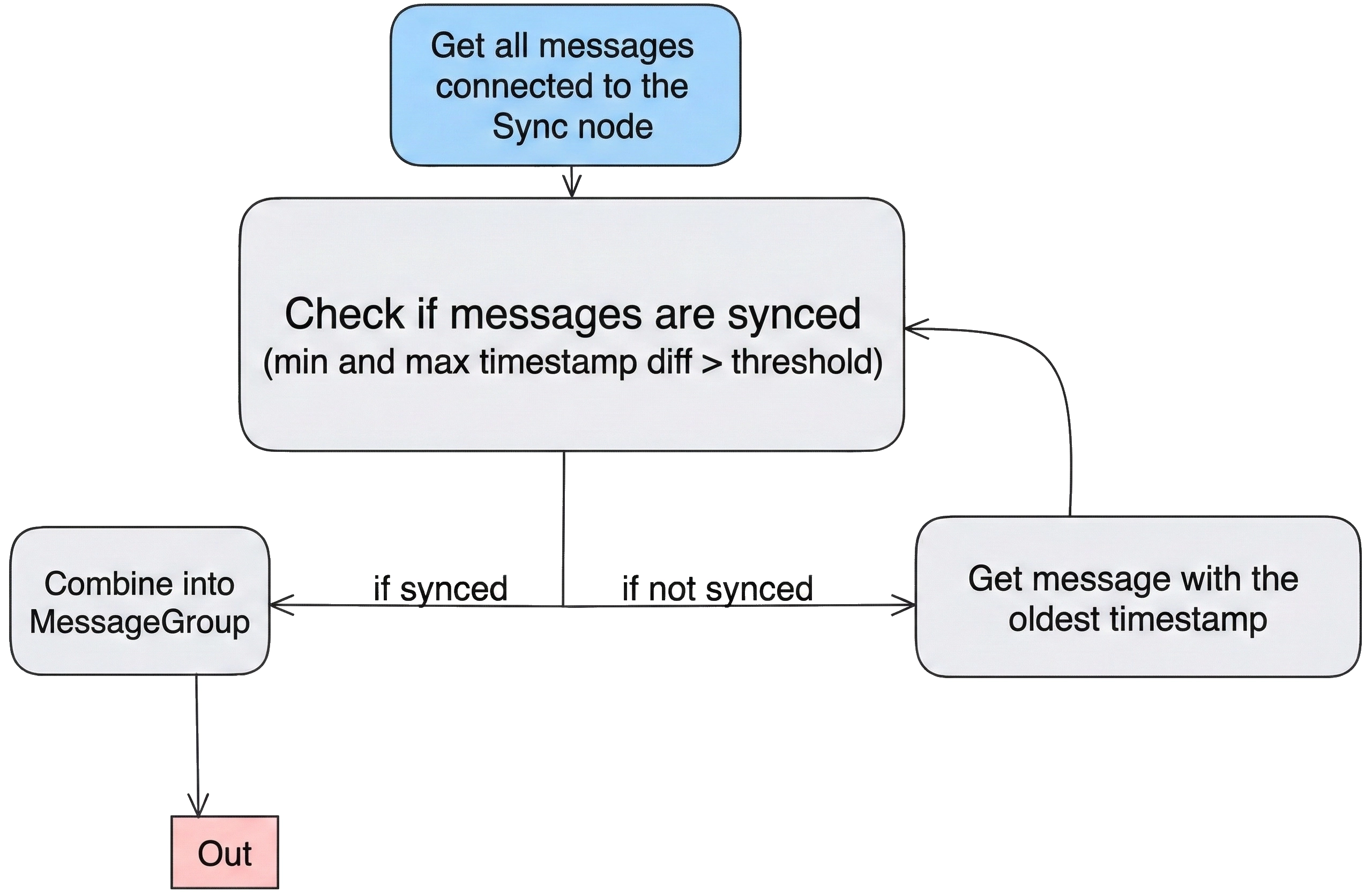
用法
Python
Python
1pipeline = dai.Pipeline()
2sync = pipeline.create(dai.node.Sync)
3
4# Configure threshold for timestamp alignment
5sync.setSyncThreshold(timedelta(milliseconds=50))
6
7# Configure inputs to be synchronized
8camRgb.video.link(sync.inputs["input1"])
9stereo.depth.link(sync.inputs["input2"])
10
11sync.out.link(xout.input)
12# ...功能示例
- Sync - 同步两个或更多数据流。
- Demuxing Synchronized Script Outputs - 使用 Sync 节点同步 Script 节点的多个输出,并使用 MessageDemux 对其进行解复用。
参考
class
dai::node::Sync
using
TimestampSource = SyncProperties::TimestampSource
variable
InputMap inputs
A map of inputs
variable
Output out
Output message of type MessageGroup
function
void setSyncThreshold(std::chrono::nanoseconds syncThreshold)Set the maximal interval between messages in the group
Parameters
- syncThreshold: Maximal interval between messages in the group
function
void setSyncAttempts(int syncAttempts)Set the number of attempts to get the specified max interval between messages in the group
Parameters
- syncAttempts: Number of attempts to get the specified max interval between messages in the group:
- if syncAttempts = 0 then the node sends a message as soon at the group is filled
- if syncAttempts > 0 then the node will make syncAttemts attempts to synchronize before sending out a message
- if syncAttempts = -1 (default) then the node will only send a message if successfully synchronized
function
void setProcessor(ProcessorType type)Specify on which processor the node should run. RVC2 only.
Parameters
- type: Processor type - Leon CSS or Leon MSS
function
ProcessorType getProcessor()Get on which processor the node should run
Returns
Processor type - Leon CSS or Leon MSS
function
void setTimestampSource(TimestampSource source)Specify the timestamp source
function
TimestampSource getTimestampSource()Get the timestamp source
function
std::chrono::nanoseconds getSyncThreshold()Gets the maximal interval between messages in the group in milliseconds
function
int getSyncAttempts()Gets the number of sync attempts
function
void setRunOnHost(bool runOnHost)Specify whether to run on host or device By default, the node will run on device.
function
bool runOnHost()Check if the node is set to run on host
function
void buildStage1()Validates the timestamp source when inputs come from more than one device.
function
void run()inline function
DeviceNodeCRTP()inline function
DeviceNodeCRTP(const std::shared_ptr< Device > & device)inline function
DeviceNodeCRTP(std::unique_ptr< Properties > props)inline function
DeviceNodeCRTP(std::unique_ptr< Properties > props, bool confMode)inline function
DeviceNodeCRTP(const std::shared_ptr< Device > & device, std::unique_ptr< Properties > props, bool confMode)需要帮助?
请访问讨论论坛以获取技术支持或您可能有的任何其他问题。