keypoint_visualizer
最后更新
luxonis_train.attached_modules.visualizers.keypoint_visualizer绘制关键点、连接它们的骨架以及它们所属的框。类
KeypointVisualizer
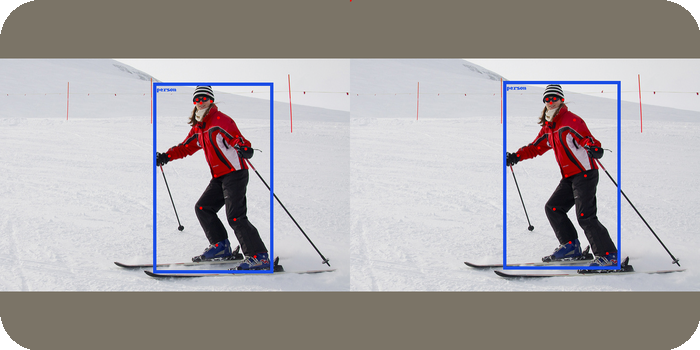
输入::prediction_canvas,target_canvas(Tensor): [B, 3, H, W]keypoints(list[Tensor]): 每张图像 [Mi, nkeypoints, 3],(x, y, conf),像素boundingbox(list[Tensor]): 每张图像 [Mi, 6],[x1, y1, x2, y2, conf, class],像素target_keypoints(Tensor | None): [N, 1 + 3**n*keypoints],[batch, x, y, v, ...],归一化target_boundingbox(Tensor | None): [N, 6],[batch, class, x, y, w, h],xywh归一化
输出::Tensor | tuple[Tensor, Tensor]: [B, 3, H, W],当给定任何目标时,为(targets, predictions)对
参考
- 来源:本项目。
- 许可证:Apache-2.0(本项目)
注意
使用 BBoxVisualizer 绘制框,然后在其上方绘制关键点、可选的骨架线和可选的关键点索引。
FOMO 任务在 supported_tasks 中,但 FOMOHead 在其数据包中没有 boundingbox 键。在该节点上,BaseVisualizer.run 会引发 RuntimeError。示例
附加到
model.nodes 中的 EfficientKeypointBBoxHead:Yaml
1- name: EfficientKeypointBBoxHead
2  inputs: [RepPANNeck]
3  visualizers:
4 - name: KeypointVisualizer方法
init
Python
1def __init__(visibility_threshold: float = 0.5, connectivity: list[tuple[int, int]] | None = None, visible_color: Color = 'red', nonvisible_color: Color | None = None, radius: int | None = None, draw_indices: bool = False, **kwargs):visibility_threshold(float): 可见预测关键点的最低置信度。draw_predictions 说明了可视化工具如何绘制其他关键点。connectivity(list[tuple[int, int]] | None): 用于连接线的关键点索引对,即骨架。适用于预测和目标。None不绘制任何线。visible_color(Color): 可见预测关键点和所有目标关键点的颜色。例如"red"或 RGB 元组。nonvisible_color(Color | None): 低于visibility_threshold的预测关键点的颜色。当为None时,可视化工具不会在它们的坐标处绘制它们。radius(int | None): 关键点的半径,以像素为单位。当为None时,forward 会根据每个画布的大小选择它。draw_indices(bool): 是否在每个关键点旁边写入其索引。draw_targets 说明了何时这会为目标关键点引发RuntimeError。**kwargs: 转发给 BBoxVisualizer 的关键字参数,例如labels、colors、width、scale和node。
draw_keypoint_indices_pil
Python
1def draw_keypoint_indices_pil(canvas: Tensor, keypoints: Tensor, offset: tuple[int, int] = (7, 7), colors: Color = 'red') -> Tensor:keypoints 展平为 (x, y, visibility) 行,并按顺序从 0 开始编号。对于多个实例,编号不会为每个实例重新开始。它不读取可见性。该方法将每个标签居中于其关键点,然后通过 offset 移动它。移动方向从一行到下一行循环:左下、右下、右上和左上。示例
Pycon
1>>> import torch
2>>> canvas = torch.zeros(3, 32, 32, dtype=torch.uint8)
3>>> keypoints = torch.tensor([[16.0, 16.0, 1.0]])
4>>> viz = KeypointVisualizer.draw_keypoint_indices_pil(
5...     canvas, keypoints
6... )
7>>> viz.dtype, viz.shape
8(torch.float32, torch.Size([3, 32, 32]))
9>>> bool(viz[0].any()), bool(viz[1].any())
10(True, False)canvas(Tensor): 形状为[3, H, W]的uint8图像。PIL 会对浮点图像引发TypeError。keypoints(Tensor): 每个关键点有三个值的像素关键点,例如[M, K, 3]或[M, 3 * K]。该方法调用view,因此无法将其视为[-1, 3]的张量会引发RuntimeError。offset(tuple[int, int]): 标签的垂直和水平偏移,以像素为单位。colors(Color): 文本颜色。
Tensor: CPU 上形状为[3, H, W]的新float32图像,值为0到255,并绘制了索引。
draw_predictions
Python
1def draw_predictions(canvas: Tensor, predictions: list[Tensor], draw_indices: bool = False, nonvisible_color: Color | None = None, visible_color: Color = 'red', visibility_threshold: float = 0.5, radius: int | None = None, scale: float = 1.0, **kwargs) -> Tensor:scale。置信度低于 visibility_threshold 的关键点是不可见的。然后,该方法使用 torchvision.utils.draw_keypoints 分两步绘制关键点:- 第一步以
visible_color绘制可见关键点,并将其钳制到图像中。它将每个不可见的关键点移动到左上角(0, 0)并在那里绘制。 - 第二步仅在设置了
nonvisible_color时运行。它以该颜色绘制不可见的关键点,并且不钳制它们。它将每个可见关键点移动到(0, 0)并在那里绘制。
draw_indices 时,每一步还会使用 draw_keypoint_indices_pil 以该步骤的颜色在其使用的位置写入关键点索引。示例
可见关键点保持其坐标:低于
Pycon
1>>> import torch
2>>> canvas = torch.zeros(1, 3, 16, 16, dtype=torch.uint8)
3>>> keypoints = [torch.tensor([[[8.0, 8.0, 0.9]]])]
4>>> viz = KeypointVisualizer.draw_predictions(
5...     canvas, keypoints, radius=1
6... )
7>>> viz[0, :, 8, 8].tolist(), viz[0, :, 0, 0].tolist()
8([255, 0, 0], [0, 0, 0])visibility_threshold 的关键点移动到左上角:Pycon
1>>> hidden = [torch.tensor([[[8.0, 8.0, 0.1]]])]
2>>> viz = KeypointVisualizer.draw_predictions(
3...     canvas, hidden, radius=1
4... )
5>>> viz[0, :, 8, 8].tolist(), viz[0, :, 0, 0].tolist()
6([0, 0, 0], [255, 0, 0])canvas(Tensor): 形状为[B, 3, H, W]的uint8图像。该方法不修改它。predictions(list[Tensor]): 每张图像一个张量,形状为[M_i, K, 3]。每个关键点是(x, y, confidence)。坐标是未缩放图像的像素。draw_indices(bool): 是否在每个关键点旁边写入其索引。nonvisible_color(Color | None): 第二步的颜色。None跳过第二步。visible_color(Color): 第一步的颜色。kwargs中的colors键会替换关键点的颜色,但不会替换索引的颜色。visibility_threshold(float): 可见关键点的最低置信度。radius(int | None): 关键点的半径,以像素为单位。当为None时,torchvision会对至少有一个关键点的图像引发TypeError。scale(float): 坐标的乘数。传递缩放画布的因子。**kwargs:torchvision.utils.draw_keypoints的关键字参数,例如connectivity和width。
Tensor: 形状与canvas相同的新张量,并绘制了关键点。
draw_targets
Python
1def draw_targets(canvas: Tensor, targets: Tensor, draw_indices: bool = False, colors: Color = 'red', **kwargs) -> Tensor:i 的关键点是 targets 中第一列等于 i 的行。draw_keypoint_labels 将它们从归一化坐标转换为像素坐标,并使用画布大小和 torchvision.utils.draw_keypoints 绘制它们。它绘制每个关键点,无论其可见性如何。示例
Pycon
1>>> import torch
2>>> canvas = torch.zeros(1, 3, 16, 16, dtype=torch.uint8)
3>>> targets = torch.tensor([[0, 0.5, 0.5, 2.0]])
4>>> viz = KeypointVisualizer.draw_targets(
5...     canvas, targets, radius=1
6... )
7>>> viz[0, :, 8, 8].tolist(), viz[0, :, 0, 0].tolist()
8([255, 0, 0], [0, 0, 0])canvas(Tensor): 形状为[B, 3, H, W]的uint8图像。该方法不修改它。targets(Tensor): 形状为[N, 1 + 3 * K]的关键点,行格式为[batch_index, x_1, y_1, v_1, ..., v_K]。坐标归一化到[0, 1]。draw_indices(bool): 是否使用 draw_keypoint_indices_pil 在每个关键点旁边写入其索引。当图像有多个实例且K大于1时,该方法会因RuntimeError而失败。colors(Color): 关键点和索引的颜色。**kwargs:torchvision.utils.draw_keypoints的关键字参数,例如radius和connectivity。
Tensor: 形状与canvas相同的新张量,并绘制了关键点。
forward
Python
1def forward(prediction_canvas: Tensor, target_canvas: Tensor, keypoints: list[Tensor], boundingbox: list[Tensor], target_keypoints: Tensor | None, target_boundingbox: Tensor | None, **kwargs) -> tuple[Tensor, Tensor] | Tensor:target_boundingbox 时,BBoxVisualizer.draw_targets 绘制目标框。当设置了 target_keypoints 时,draw_targets 以 visible_color 在其上方绘制目标关键点。当 radius 为 None 时,半径来自每个画布的大小。当两边都小于 96 像素时为 1,当一边大于 512 像素时为 5,否则为 2。示例
Pycon
1>>> import torch
2>>> visualizer = KeypointVisualizer(
3...     labels=["person"], colors=["red"]
4... )
5>>> canvas = torch.zeros(1, 3, 16, 16, dtype=torch.uint8)
6>>> boxes = [torch.tensor([[2.0, 2.0, 14.0, 14.0, 0.9, 0.0]])]
7>>> keypoints = [torch.tensor([[[8.0, 8.0, 0.9]]])]
8>>> visualizer(canvas, canvas, keypoints, boxes, None, None).shape
9torch.Size([1, 3, 16, 16])
10>>> targets = torch.tensor([[0, 0.5, 0.5, 2.0]])
11>>> len(
12...     visualizer(canvas, canvas, keypoints, boxes, targets, None)
13... )
142prediction_canvas(Tensor): 形状为[B, 3, H, W]的uint8图像,用于绘制预测。target_canvas(Tensor): 形状为[B, 3, H, W]的uint8图像,用于绘制目标。keypoints(list[Tensor]): 每张图像一个张量,形状为[M_i, K, 3]。每个关键点是(x, y, confidence),其中x和y以像素为单位。draw_predictions 按scale因子缩放坐标。boundingbox(list[Tensor]): 每张图像一个张量,形状为[M_i, 6],行格式为[x1, y1, x2, y2, conf, class],以像素为单位。BBoxVisualizer.draw_predictions 按scale因子缩放它们。target_keypoints(Tensor | None): 形状为[N, 1 + 3 * K]的关键点,行格式为[batch_index, x_1, y_1, v_1, ..., v_K]。坐标归一化到[0, 1]。当批次没有keypoints标签时为None。target_boundingbox(Tensor | None): 形状为[N, 6]的框,行格式为[batch_index, class, x, y, w, h],xywh归一化到[0, 1]。当批次没有boundingbox标签时为None。**kwargs:torchvision.utils.draw_keypoints的关键字参数,例如width。该方法将它们传递给 draw_predictions 和 draw_targets。该方法也按名称传递的键(例如radius或connectivity)会引发TypeError。BaseVisualizer.run 不传递任何参数。
tuple[Tensor, Tensor] | Tensor: 当设置了target_keypoints或target_boundingbox时,返回绘制图像的(targets, predictions)对;否则只返回预测图像。