mosaic
最后更新
luxonis_ml.data.augmentations.custom.mosaic类
Mosaic4
| 第 1 列 | 第 2 列 |
|---|---|
| 1 | 2 |
| 3 | 4 |
out_width 乘以 out_height,并在需要时用指定的填充值进行填充。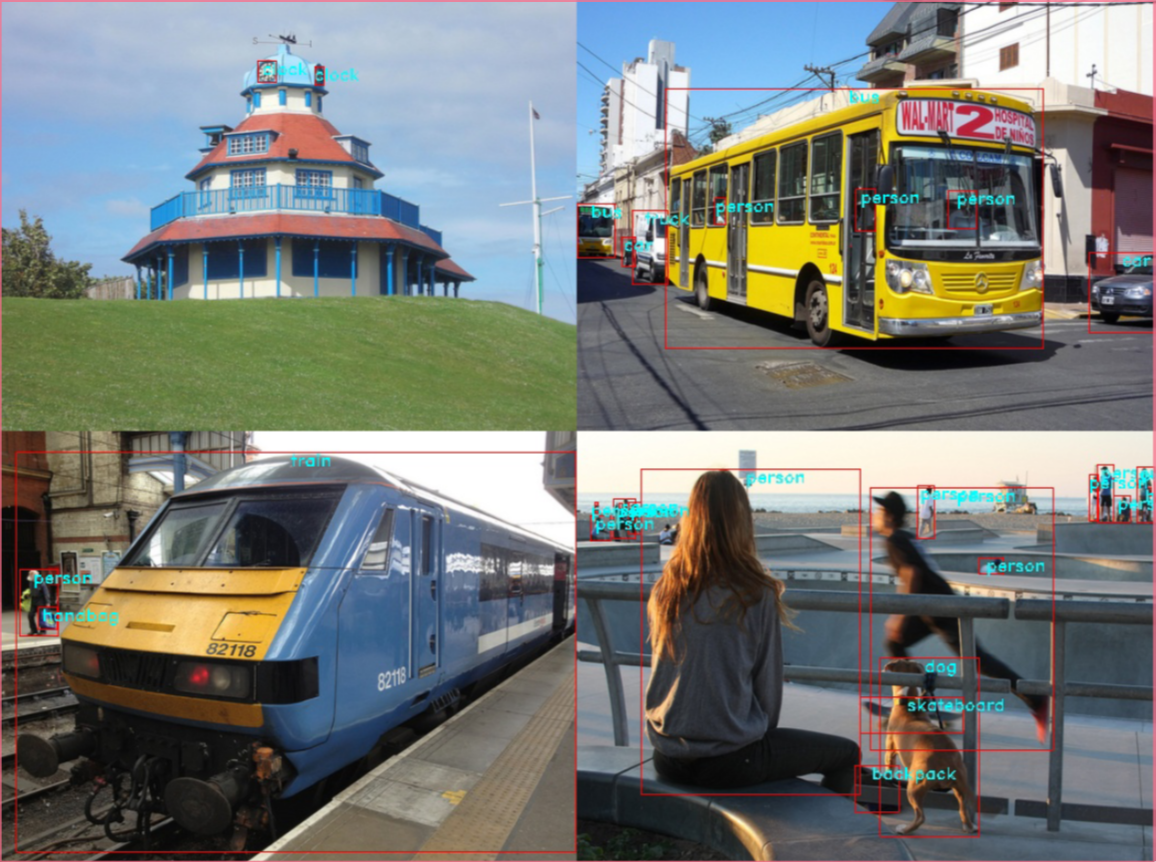
另请参阅
方法
init
Python
1def __init__(height: int | None = None, width: int | None = None, image_fill_value: float | list[int] | list[float] | None = None, mask_fill_value: float | list[int] | list[float] | None = None, p: float = 0.5, out_height: int | None = None, out_width: int | None = None, value: float | list[int] | list[float] | None = None, mask_value: float | list[int] | list[float] | None = None):height(int | None): 输出图像高度。width(int | None): 输出图像宽度。image_fill_value(float | list[int] | list[float] | None): 图像的填充值。mask_fill_value(float | list[int] | list[float] | None): 掩码的填充值。p(float): 应用变换的概率。out_height(int | None):已弃用自 0.9.0 版本起已弃用:请改用height。out_width(int | None):已弃用自 0.9.0 版本起已弃用:请改用width。value(float | list[int] | list[float] | None):已弃用自 0.9.0 版本起已弃用:请改用image_fill_value。mask_value(float | list[int] | list[float] | None):已弃用自 0.9.0 版本起已弃用:请改用mask_fill_value。
ValueError: 如果解析的输出高度或宽度缺失或不大于 0。
apply
Python
1def apply(image_batch: list[np.ndarray], x_crop: int, y_crop: int, **_) -> np.ndarray:image_batch(list[np.ndarray]): 要变换的图像。每张图像的形状应为 (H, W, C) 或 (H, W)。x_crop(int): 裁剪起始点的 X 坐标。y_crop(int): 裁剪起始点的 Y 坐标。**_
np.ndarray: 形状为 (Hout, Wout, C) 或 (Hout, Wout) 的单张图像。
apply_to_bboxes
Python
1def apply_to_bboxes(bboxes_batch: list[np.ndarray], image_shapes: list[tuple[int, int]], x_crop: int, y_crop: int, **_) -> np.ndarray:bboxes_batch(list[np.ndarray]): 要变换的边界框。image_shapes(list[tuple[int, int]]): 原始图像形状。x_crop(int): 裁剪起始点的 X 坐标。y_crop(int): 裁剪起始点的 Y 坐标。**_
np.ndarray: 变换后的边界框。
apply_to_instance_mask
Python
1def apply_to_instance_mask(masks_batch: list[np.ndarray], x_crop: int, y_crop: int, **_) -> np.ndarray:masks_batch(list[np.ndarray]): 要变换的掩码。每个掩码的形状应为 (H, W, N),其中 N 是实例数。x_crop(int): 裁剪起始点的 X 坐标。y_crop(int): 裁剪起始点的 Y 坐标。**_
np.ndarray: 形状为 (Hout, Wout, N) 的单个实例掩码。
apply_to_keypoints
Python
1def apply_to_keypoints(keypoints_batch: list[np.ndarray], image_shapes: list[tuple[int, int]], x_crop: int, y_crop: int, **_) -> np.ndarray:keypoints_batch(list[np.ndarray]): 要变换的关键点。image_shapes(list[tuple[int, int]]): 原始图像形状。x_crop(int): 裁剪起始点的 X 坐标。y_crop(int): 裁剪起始点的 Y 坐标。**_
np.ndarray: 变换后的关键点。
apply_to_mask
Python
1def apply_to_mask(mask_batch: list[np.ndarray], x_crop: int, y_crop: int, out_height: int, out_width: int, **_) -> np.ndarray:mask_batch(list[np.ndarray]): 要变换的掩码。每个掩码的形状应为 (H, W, C) 或 (H, W)。x_crop(int): 裁剪起始点的 X 坐标。y_crop(int): 裁剪起始点的 Y 坐标。out_height(int): 输出掩码的预期高度。out_width(int): 输出掩码的预期宽度。**_
np.ndarray: 形状为 (Hout, Wout, C) 或 (Hout, Wout) 的单个分割掩码。
generate_random_crop_center
Python
1def generate_random_crop_center(self) -> tuple[int, int]:get_params_dependent_on_data
Python
1def get_params_dependent_on_data(params: dict[str, Any], data: dict[str, Any]) -> dict[str, Any]:params(dict[str, Any]): 现有增强参数。data(dict[str, Any]): 输入数据。
dict[str, Any]: 从输入目标派生的参数。